





























































Jalpi ships 49 registered widgets plus three structural node types. This page is the catalogue — every widget's type key, its palette group, what it does, and whether it is implemented as a bespoke element class or through the schema-driven generic path.
The type key is the important column. It is what appears in stored JSON, what the sanitiser validates against, what the renderer dispatches on, and what you would reference in a template or a migration. Labels change; type keys are the contract.
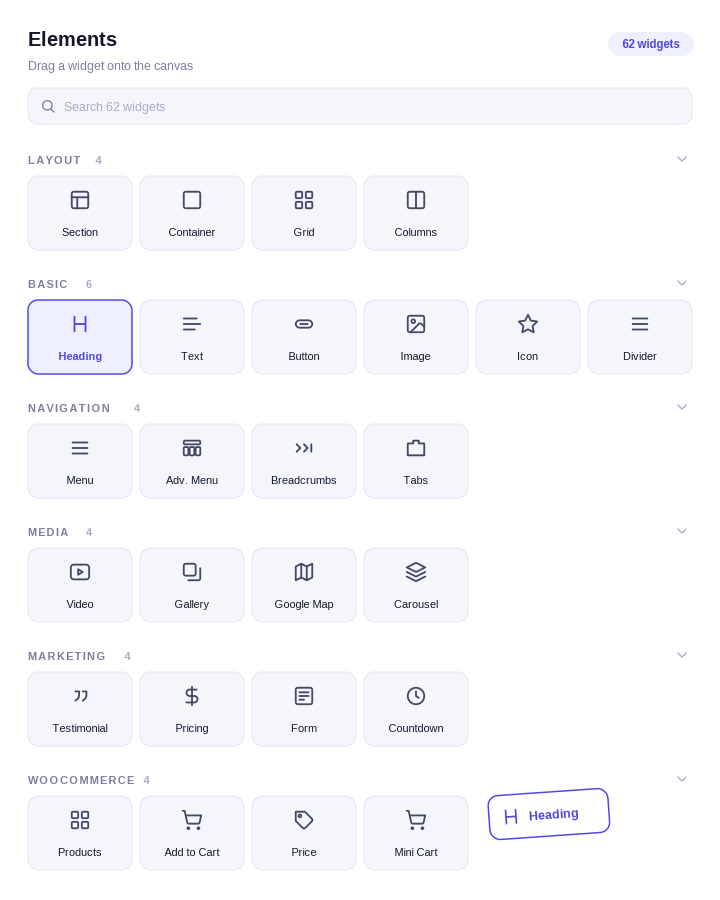
The catalogue is grouped the way the Elements panel groups it, and closes with the cross-cutting features every widget inherits regardless of how it is implemented.
How to Read This Catalogue#
Each entry lists a type key, a label, and an implementation:
- Bespoke — a dedicated
Jalpi_Element_{Type}class inincludes/elements/, its owncasein the sanitiser, a*Contentcomponent inPropertiesPanel.tsxand a renderer inCanvasNode.tsx. - Schema — defined only by its
registry.tsentry and its mirror inwidgets-schema.php, rendered byJalpi_Element_Genericand edited byGenericContent.
The split is 40 bespoke and 9 schema-driven. It reflects history and rendering needs, not importance — the WooCommerce widgets are bespoke because a live WC_Query with AJAX pagination cannot be expressed as a field schema, while Icon Box is schema-driven despite using the full icon-library picker.
Palette groups come from each entry's category. The Elements panel places some types through hardcoded lists and auto-groups the rest by category, so a widget's group here is where it actually appears in the panel.
Layout#
The three structural types. They hold other nodes rather than producing content, and their element classes call render_children().
| Type | Label | Purpose | Implementation |
|---|---|---|---|
section | Section | Full-width row wrapper | Bespoke |
container | Container | Flex/grid content container | Bespoke |
column | Column | Column inside a container | Bespoke |
The container carries the layout model — block, flex or grid — described in detail on the Canvas Rendering page. Sections decide whether they break out of the theme's content container via contentWidth.
These three are excluded from the Block picker: GROUP_TO_CATEGORY maps Layout to null, matching the picker's original contents.
Basic#
| Type | Label | Purpose | Implementation |
|---|---|---|---|
heading | Heading | Title or section headline | Bespoke |
text | Text Editor | Rich text paragraph block | Bespoke |
button | Button | Call-to-action button | Bespoke |
icon | Icon | Scalable SVG icon | Bespoke |
divider | Divider | Horizontal rule separator | Bespoke |
spacer | Spacer | Vertical whitespace | Bespoke |
accordion | Accordion | Collapsible content panels | Bespoke |
tabs | Tabs | Tabbed content panels | Bespoke |
tabs-adv | Tabs (Advanced) | Tabs where each panel holds real widgets | Bespoke |
counter | Counter | Display a stat number with label | Bespoke |
progress | Progress Bar | Skill or completion bar | Bespoke |
badge | Badge | Small inline label or tag | Bespoke |
icon-list | Icon List | List with icons per item | Bespoke |
icon-box | Icon Box | A chosen icon with optional title, text and link | Schema |
Heading and Text are the two inline-editable types alongside Button and HTML — double-clicking them on the canvas edits in place. Heading stores plain text plus a tag (h1–h6) and permits a narrow set of inline tags; Text stores arbitrary editor html.
Tabs and Tabs (Advanced) differ fundamentally. Plain Tabs stores its panel content as strings in content.items. Tabs (Advanced) seeds three real container children, index-aligned with its content.items metadata, so any widget can be dropped into a panel.
Icon Box exists specifically to demonstrate the full icon-library picker (control: 'icon') inside a schema widget — proof that a schema-driven widget is not limited to primitive controls.
Navigation#
| Type | Label | Purpose | Implementation |
|---|---|---|---|
menu | Menu | Navigation menu with dropdowns | Bespoke |
adv-menu | Advanced Menu | Mega menu with builder content in dropdown panels | Bespoke |
breadcrumbs | Breadcrumbs | Trail from the site root to this page | Bespoke |
Both menu widgets render a WordPress navigation menu, selected by menuId or menuLocation. A freshly dropped Menu has neither set, so the canvas shows a placeholder prompting the author to pick one.
Advanced Menu is a separate element from Menu, not a variant. Its megaItems map keys a WordPress menu-item id to { enabled, cols, panelIndex }, and its mega panels are real container children — the same pattern as Tabs (Advanced), so any widget can live inside a panel. Column counts are clamped to 1–12.
Breadcrumbs emits schema.org microdata. That is why Jalpi_Renderer::allowed_html() extends the kses allowlist with itemscope, itemtype, itemprop, itemid, itemref and meta content — without them kses would silently strip the structured data.
The Block picker has no Navigation tab, so GROUP_TO_CATEGORY folds these into Basic there. The Elements panel keeps its own Navigation group.
Media#
| Type | Label | Purpose | Implementation |
|---|---|---|---|
image | Image | Photo or illustration | Bespoke |
video | Video | YouTube, Vimeo or MP4 | Bespoke |
logo | Logo | Clickable logo image | Bespoke |
maps | Google Maps | Embedded map widget | Bespoke |
gallery | Gallery | Image gallery with grid, masonry, lightbox and hover effects | Bespoke |
image-carousel | Image Carousel | Sliding image carousel with autoplay, arrows, lightbox and hover effects | Bespoke |
image-box | Image Box | Image with title and description | Bespoke |
Video supports YouTube, Vimeo and direct MP4 sources. The YouTube path can use the privacy-enhanced youtube-nocookie.com domain, configured per element.
Gallery and Image Carousel both flag the frontend script — Gallery conditionally, depending on whether filtering or the lightbox is enabled.
image-box reaches this group through the auto-grouping path rather than a hardcoded list, since its registry category is Media.
Marketing#
| Type | Label | Purpose | Implementation |
|---|---|---|---|
alert | Alert | Info, success, warning or error notice | Bespoke |
feature-card | Feature Card | Icon + title + description card | Bespoke |
cta | Call To Action | Headline + subtext + action buttons | Bespoke |
testimonials | Testimonials | Modern testimonial grid or carousel with ratings and author profiles | Bespoke |
social-icons | Social Icons | Social media icon links bar | Bespoke |
countdown | Countdown | Live countdown timer to a target date | Bespoke |
flip-box | Flip Box | Card with a flipping front and back face | Bespoke |
star-rating | Star Rating | Standalone star rating display | Bespoke |
Testimonials (plural) takes a layout of grid or carousel and a cols count clamped to 1–4, with each item carrying text, name, role, avatar and rating. It flags the carousel script only when in carousel layout.
Note the singular testimonial type is a different, older widget — see Unreachable Types below.
social-icons, countdown, flip-box and star-rating reach this group through auto-grouping rather than a hardcoded list.
Widgets#
| Type | Label | Purpose | Implementation |
|---|---|---|---|
form | Form | CF7, WPForms, Forminator, Gravity Forms | Bespoke |
html | HTML | Custom HTML block | Bespoke |
shortcode | Shortcode | WordPress shortcode | Bespoke |
Form integrates four form plugins through Jalpi_Forms, which detects each by plugin file and lists its forms for the picker:
| Key | Plugin | Detected by |
|---|---|---|
cf7 | Contact Form 7 | contact-form-7/wp-contact-form-7.php |
forminator | Forminator | forminator/forminator.php |
wpforms | WPForms | wpforms-lite/wpforms.php or wpforms/wpforms.php |
gravityforms | Gravity Forms | gravityforms/gravityforms.php |
Content is { plugin, form_id }, and rendering delegates to each plugin's own API — including calling wpcf7_enqueue_scripts() so Contact Form 7's assets load.
A page containing a form node deliberately bypasses the render transient cache, because form plugins embed per-request nonces that go stale in cached HTML.
Shortcode is capability-gated at the sanitiser: only a user who can edit_posts may store a shortcode value. For anyone else the field is saved empty.
HTML is one of the four inline-editable types.
Effects#
All three are schema-driven — defined entirely by a registry entry plus a widgets-schema.php mirror, with no PHP class and no bespoke component.
| Type | Label | Purpose | Fields |
|---|---|---|---|
marquee | Marquee | Continuously scrolling text ticker | text, speed, direction, pauseOnHover, itemSpacing |
typewriter-text | Typewriter Text | Types out a rotating list of phrases | words, tag, typeSpeed, loop, cursorStyle, cursorColor, cursorWidth |
shape-divider | Shape Divider | Decorative SVG section divider | shape, color, height, flip, widthPct, zIndex |
Marquee and Typewriter Text both declare needsJs. Shape Divider is pure CSS and SVG.
Shape Divider offers four shapes — wave, tilt, curve, triangle — as static SVG paths. widthPct between 100 and 300 lets the shape overhang for full-bleed dividers, and zIndex gives bring-forward and send-backward control.
Typewriter Text stores its phrases as a newline-separated string in words; the renderer splits, sanitises each line and JSON-encodes them into a data-words attribute. Cursor styling is optional and absent keys keep the original glyph caret, so older saved nodes render identically.
Social#
All five are schema-driven.
| Type | Label | Purpose | Needs JS |
|---|---|---|---|
social-share | Social Share | A row of linked social icons — pick any icon, set its link | No |
whatsapp-button | WhatsApp Button | Click-to-chat WhatsApp button, inline or floating | No |
youtube-gallery | YouTube Gallery | Grid of YouTube videos, lazy-loaded on click, no API | Yes |
facebook-feed | Facebook Post | Embed a public Facebook post (single-post oEmbed) | Yes |
instagram-feed | Instagram Post | Embed a public Instagram post/reel (single-post oEmbed) | Yes |
Social Share shows the schema path handling structured data. Its items field uses the social-items control: a JSON list of { icon, link, color } objects, sanitised item by item on the server with the same icon and URL helpers the bespoke widgets use, then re-encoded. Its schema also retains three legacy fields — networks, networkColors and shareUrl — kept so content saved before the icon repeater existed still renders.
YouTube Gallery takes one video ID or URL per line and lazy-loads each iframe on click, so a gallery of ten videos costs one thumbnail each until clicked. It uses no YouTube API.
The Facebook and Instagram widgets embed a single public post by URL rather than pulling a feed, despite the -feed suffix in their type keys.
WooCommerce#
| Type | Label | Purpose | Implementation |
|---|---|---|---|
products-grid | Products Grid | WooCommerce product grid with live query, skins and pagination | Bespoke |
product-categories | Product Categories | WooCommerce category grid, list or carousel with images and counts | Bespoke |
single-product | Single Product | Full single-product layout: gallery, price, cart, tabs and related | Bespoke |
These are bespoke for a specific reason the registry states outright: the grid runs a real WC_Query server-side and paginates over AJAX, neither of which the schema path can express.
Jalpi_Woo_Ajax is registered unconditionally, not gated on WooCommerce being active, so the grid still paginates its placeholder products on a site without WooCommerce. The cart endpoint self-guards on WooCommerce being loaded.
The AJAX handler rebuilds the query from the saved node, so only the post id, node id and page number travel over the wire — the query arguments themselves are never client-supplied. jalpi_products_grid_query_args and jalpi_product_categories_args are the filters for adjusting them.
Single Product handles simple products itself, including gallery thumbnails, quantity steppers and AJAX add-to-cart. Variable products render WooCommerce's own form, which brings its own script — the runtime deliberately does not touch it.
The editor hides shop-only controls on sites without WooCommerce, driven by the hasWoo flag in jalpiEditorConfig.
Separately, the Block picker carries four hand-authored WooCommerce shortcode quick-inserts — WC Products, WC Cart, WC Checkout and WC My Account. All four insert a shortcode node rather than a dedicated type, which is why they live in BlockPicker.tsx rather than the type-keyed registry.
Unreachable Types#
Seven types exist in the ElementType union and are fully implemented, but have no WIDGET_REGISTRY entry:
| Type | Content shape |
|---|---|
testimonial | text, name, role, avatarUrl, rating (clamped 1–5) |
pricing-table | name, tagline, currency, amount, period, features[], btnText, btnUrl, featured |
team-member | photoUrl, name, role, bio, linkedin, twitter |
faq | items[] of { question, answer, defaultOpen } |
table | headers[], rows[][], caption |
stats-card | value, label, sublabel |
timeline | items[] of { date, title, text } |
Each has a working Jalpi_Element_ class, a case in the sanitiser, a Content component in the inspector, a *StyleTab where relevant, and a renderer in CanvasNode. They render correctly wherever they appear in saved content — an imported template, a starter kit, or a page built before their registry entries went missing.
What they lack is an insertion path. See the warnings.
Element Categories in the Editor#
In the editor's Elements panel, and in the Element Manager, the insertable elements are grouped into eight categories. Sections, containers, columns and grids are structural and sit outside these groups.
| Category | Elements |
|---|---|
| Basic | Heading, Text Editor, Button, Icon, Divider, Spacer, Accordion, Tabs, Counter, Progress Bar, Badge, Icon List, Icon Box |
| Navigation | Menu, Advanced Menu, Breadcrumbs |
| Media | Image, Video, Logo, Google Maps, Gallery, Image Carousel, Image Box |
| Marketing | Alert, Testimonials, Feature Card, Call To Action, Social Icons, Countdown, Flip Box, Star Rating |
| Widgets | Form, HTML, Shortcode |
| Effects | Marquee, Typewriter Text, Shape Divider |
| Social | Social Share, WhatsApp Button, YouTube Gallery, Facebook Feed, Instagram Feed |
| WooCommerce | Products Grid, Product Categories, Single Product |
Dedicated guides: Advanced Menu (mega panels, triggers, animations, mobile layouts, keyboard and RTL), Menu, Breadcrumbs and Shortcode & Google Maps.
Which Widgets Need JavaScript#
The renderer enqueues assets/js/jalpi-frontend.js only when at least one node on the page sets a flag through set_needs_js(). This is the full map of what sets which flag:
| Flag | Set by |
|---|---|
carousel | testimonials — carousel layout only |
tabs | tabs, tabs-adv |
countdown | countdown |
counter | counter |
progress | progress |
faq | faq |
image_carousel | image-carousel |
gallery | gallery — when filtering or the lightbox is enabled |
interaction | Any node with at least one enabled interaction rule |
generic | menu, adv-menu, products-grid, product-categories, single-product, split-text, any node with split text enabled, and any schema widget declaring needsJs |
Widgets not listed here are pure HTML and CSS — Heading, Text, Button, Image, Divider, Spacer, Badge, Icon List, Alert, Feature Card, CTA, Shape Divider and the rest add no JavaScript to the page at all.
The script itself is a second gate: each of its 26 initialisers opens with a selector check and returns immediately when its widget is absent.
What Every Widget Inherits#
Regardless of type or implementation, every node gets the same set of capabilities — because they are handled by the tree and the renderer rather than by individual widgets.
| Feature | Provided by |
|---|---|
| Style, background, border, spacing controls | The shared Style and Advanced tabs |
| Per-breakpoint style overrides | tabletStyles / mobileStyles on the node |
| Per-device visibility | hideOn, applied in maybe_add_responsive_rules() |
| Layer lock | locked on the node |
| Design System token and preset links | globalStyleRef |
| Reusable classes | settings.cssClasses |
Custom CSS with the selector token | settings.customCss |
| CSS id and free-text classes | settings.cssId, settings.cssClass |
| Interactions | interactions[] on the node |
| Split text | settings.st_enabled, emitted from get_css_attrs() |
| Copy, paste, duplicate, undo, drag-and-drop | The editor store's tree operations |
| Save as template, import and export | The template system |
Split text is worth singling out. Because the data-jalpi-st attribute is emitted from get_css_attrs() rather than per widget, a single Animation-tab control reaches Heading, Text, Button, CTA, FAQ, Pricing, Testimonials and every other element at once. It is gated on settings.st_enabled, so any node saved before the feature existed renders exactly as it did.
The registry's own comment makes the point about schema widgets specifically: style, advanced, animation, responsive, global-styles, copy-paste, undo and import-export all operate on the node tree generically already, so a new schema-driven widget inherits every one of them for free.
Dynamic tags are the other cross-cutting feature, though they are not automatic: an element must call $renderer->tags( … )->resolve() on the fields that should support them.
Examples#
Type keys as they appear in stored JSON#
The type key is the contract — it is what the sanitiser validates, the renderer dispatches on, and a template or migration references.
{
  "id": "marquee_9k2f1a3",
  "type": "marquee",
  "content": {
    "text": "Breaking news · Announcement · Scrolling message ·",
    "speed": "20",
    "direction": "left",
    "pauseOnHover": true,
    "itemSpacing": "60"
  },
  "styles": { "fontSize": "18px", "color": "#1a1a1a" }
}
Widgets that hold other widgets#
Tabs (Advanced) and Advanced Menu seed real container children, index-aligned with their content metadata, so any widget can be dropped inside.
{
  "id": "tabs-adv_p4q5r6s",
  "type": "tabs-adv",
  "content": {
    "tabStyle": "underline",
    "activeTab": 0,
    "items": [
      { "id": "t1", "title": "Overview", "icon": "", "cssId": "" },
      { "id": "t2", "title": "Pricing",  "icon": "", "cssId": "" }
    ]
  },
  "children": [
    { "id": "container_a1", "type": "container", "settings": { "columns": 1 }, "children": [] },
    { "id": "container_b2", "type": "container", "settings": { "columns": 1 }, "children": [] }
  ]
}
A form node#
Content is just the plugin key and the form id; rendering delegates to that plugin's own API.
{
  "id": "form_t7u8v9w",
  "type": "form",
  "content": {
    "plugin": "cf7",          // cf7 | forminator | wpforms | gravityforms
    "form_id": "142"
  }
}
Social Share's structured items#
The social-items control stores a JSON string. The server decodes it, sanitises each item with the shared icon and URL helpers, and re-encodes.
{
  "id": "social-share_x1y2z3a",
  "type": "social-share",
  "content": {
    "items": "[{\"icon\":{\"type\":\"font\",\"lib\":\"fab\",\"name\":\"facebook-f\",\"cls\":\"fab fa-facebook-f\"},\"link\":\"https://facebook.com/example\",\"color\":\"#1877f2\"}]",
    "style": "filled",
    "shape": "rounded"
  }
}
An unreachable type in saved content#
A pricing-table node renders correctly wherever it already exists — it simply cannot be inserted from the editor UI today.
{
  "id": "pricing-table_b4c5d6e",
  "type": "pricing-table",
  "content": {
    "name": "Pro",
    "tagline": "For growing teams",
    "currency": "$",
    "amount": "29",
    "period": "mo",
    "features": ["Unlimited pages", "Priority support", "Custom domain"],
    "btnText": "Start free trial",
    "btnUrl": "/signup",
    "featured": true
  }
}
How a widget requests the frontend script#
A bespoke element calls set_needs_js() directly; a schema widget declares needsJs and Jalpi_Element_Generic makes the call for it.
// Bespoke — Jalpi_Element_Countdown
$renderer->set_needs_js( 'countdown' );

// Conditional — Jalpi_Element_Testimonials, carousel layout only
if ( 'carousel' === $layout ) {
    $renderer->set_needs_js( 'carousel' );
}

// Schema-driven — declared in includes/widgets-schema.php
'youtube-gallery' => [
    'render'  => 'youtube-gallery',
    'needsJs' => true,
    'fields'  => [ 'videos' => 'textarea', 'columns' => 'number' ],
],

// …which Jalpi_Element_Generic turns into:
if ( ! empty( $schema['needsJs'] ) ) {
    $renderer->set_needs_js( 'generic' );
}Notes#
- Type keys are the stable contract; labels are not.
facebook-feedandinstagram-feedembed a single public post rather than a feed, andtestimonials(plural) is a different widget fromtestimonial(singular). - Four types are inline-editable on the canvas by double-click:
heading,text,buttonandhtml. Every other widget is edited through the inspector. - Two widgets hold real child containers rather than string content:
tabs-advandadv-menu. Theirchildrenarray is index-aligned with the metadata incontent.itemsorcontent.megaItems. Jalpi_Woo_Ajaxis registered unconditionally so the Products Grid paginates its placeholder products even on a site without WooCommerce. The cart endpoint self-guards on WooCommerce being loaded.- The Products Grid AJAX handler rebuilds its query from the saved node — only the post id, node id and page number travel over the wire, so query arguments are never client-supplied.
- A page containing a
formnode bypasses the render transient cache, because form plugins embed per-request nonces that go stale in cached HTML. - The
shortcodewidget is capability-gated in the sanitiser: only a user who canedit_postsmay store a shortcode. For anyone else the value is saved empty. - Breadcrumbs emits schema.org microdata, which is why
allowed_html()extends the kses allowlist withitemscope,itemtype,itemprop,itemid,itemrefandmeta content. - Widgets not in the JS map add no JavaScript to the page. Heading, Text, Button, Image, Divider, Spacer, Badge, Icon List, Alert, Feature Card, CTA and Shape Divider are pure HTML and CSS.
Warnings#
- Seven implemented types cannot be inserted from any editor surface:
testimonial,pricing-table,team-member,faq,table,stats-cardandtimeline. They have noWIDGET_REGISTRYentry, and the Elements panel, Block picker and command palette all build their lists from the registry-derivedBLOCKSarray. Existing nodes of these types keep rendering; new ones can only arrive through a template, a starter kit or direct data manipulation. - As a consequence, the Elements panel's
CONTENTgroup is empty. All four of its hardcoded types —faq,table,team-member,timeline— are unregistered, and no registry entry carries theContentcategory, so the group is filtered out by the panel'sitems.length > 0check and the tab never appears. - The Marketing group is likewise incomplete:
testimonial,pricing-tableandstats-cardare listed in the panel'sMARKETING_TYPESbut resolve to nothing, so four of its seven hardcoded types are missing from the palette. - Do not assume a widget with a
*Contentcomponent inPropertiesPanel.tsxis insertable. The inspector panel, the element class and the canvas renderer can all exist while the registry entry does not — that is exactly the state the seven types above are in. - The four WooCommerce shortcode quick-inserts in the Block picker all insert a
shortcodenode, not a dedicated type. Searching stored JSON for a WooCommerce grid will not find them under a WooCommerce type key. - Widget labels and descriptions live only in
registry.tsand are not translated — they are plain string literals with no__()wrapper, unlike the PHP-side strings.
Source Files#
admin/editor/src/widgets/registry.tsadmin/editor/src/widgets/GenericContent.tsxadmin/editor/src/widgets/GenericRenderer.tsxadmin/editor/src/components/canvas/BlockPicker.tsxadmin/editor/src/components/panels/ElementsPanel.tsxadmin/editor/src/components/panels/PropertiesPanel.tsxadmin/editor/src/components/canvas/CanvasNode.tsxadmin/editor/src/types/index.tsincludes/widgets-schema.phpincludes/class-jalpi-sanitizer.phpincludes/class-jalpi-renderer.phpincludes/class-jalpi-forms.phpincludes/class-jalpi-woo-ajax.phpincludes/class-jalpi-woo-query.phpincludes/class-jalpi-woo-terms.phpincludes/elements/class-jalpi-element-generic.phpincludes/elements/class-jalpi-element-testimonials.phpincludes/elements/class-jalpi-element-tabs-adv.phpincludes/elements/class-jalpi-element-adv-menu.phpincludes/elements/class-jalpi-element-menu.phpincludes/elements/class-jalpi-element-breadcrumbs.phpincludes/elements/class-jalpi-element-countdown.phpincludes/elements/class-jalpi-element-gallery.phpincludes/elements/class-jalpi-element-image-carousel.phpincludes/elements/class-jalpi-element-split-text.phpincludes/elements/class-jalpi-element-products-grid.phpincludes/elements/class-jalpi-element-single-product.phpassets/js/jalpi-frontend.js
Related#
Last updated: November 2026