





























































The Breadcrumbs element (breadcrumbs) sits in the Navigation group. You do not enter any links: the trail is built when the page is viewed, from the page's place in your site (its parent pages, category, archive or search context). Drop it into a template once, for example your single-post template, and it works for every page that template covers.
What changed in 1.0.5#
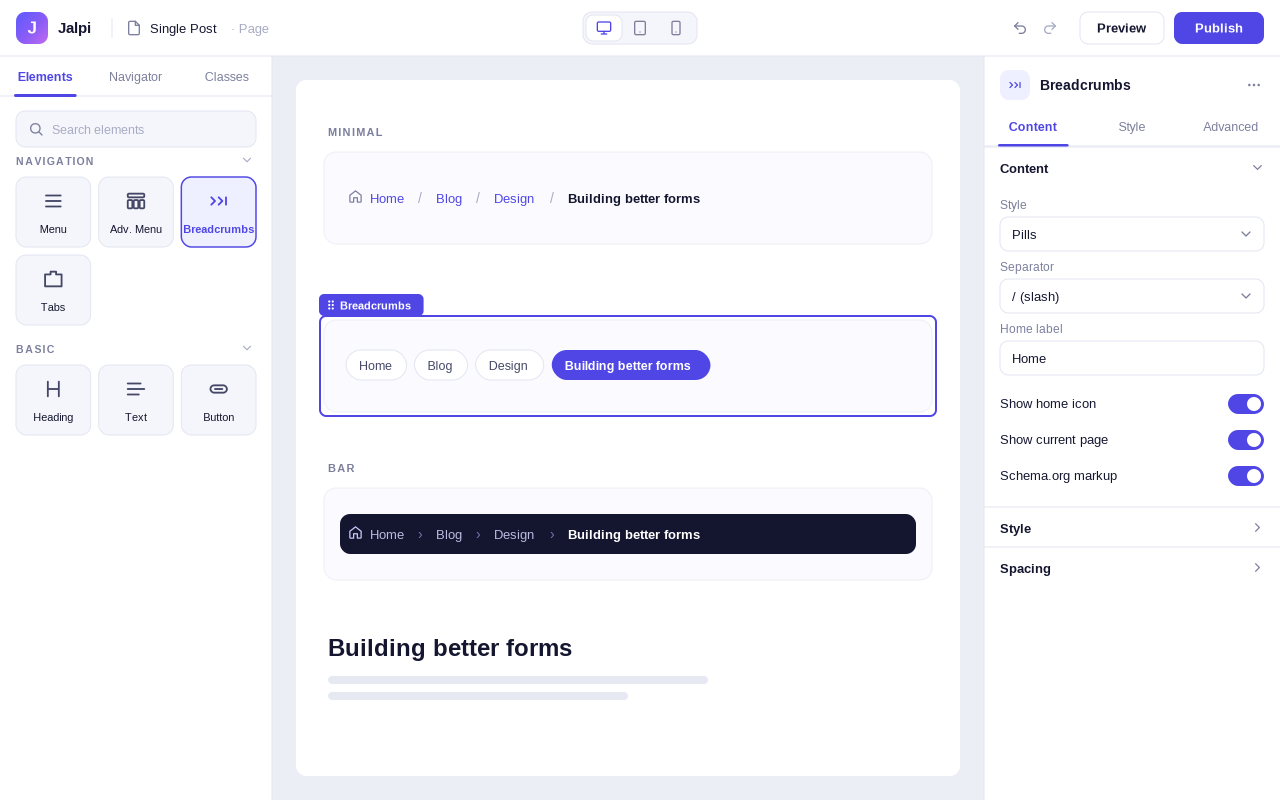
- A redesign with three visual styles: Minimal, Pills and Bar.
- An optional Home Icon.
- Empty label fields now fall back to "Home" and "Breadcrumb" instead of rendering blank.
- The front page no longer shows a lone "Home" crumb: the element renders nothing there.
- The editor preview now follows your Style tab settings (colours, font size and gap).
- The IT Services starter site now uses the real Breadcrumbs element.
Adding Breadcrumbs#
- Add Breadcrumbs from the Navigation group of the Elements panel.
- Choose a Style and Separator in the Content tab.
- Style the colours and spacing in the Style tab.
The canvas shows a sample
- In the editor the trail is always the sample "Home / Parent Page / Current Page", so you can design it. The real trail appears on the published page.
- If you build a Theme Builder template, place the element once in the template. See Theme Single and Theme Archive.
Content tab reference#
| Control | Options | Default |
|---|---|---|
| Style | Minimal, Pills, Bar | Minimal |
| Separator | › Chevron, / Slash, → Arrow, · Dot, | Pipe | Chevron |
| Show Home | On / off | On |
| Home Icon | On / off. Shown only when Show Home is on. Adds a small house icon before the first crumb. | Off |
| Home Label | Text. Shown only when Show Home is on. Left empty, it shows "Home". | Home |
| Show Current Page | On / off. Off removes the last crumb. | On |
| ARIA Label | Text. Left empty, it uses "Breadcrumb". | Breadcrumb |
The three styles#
| Style | Look | Best for |
|---|---|---|
| Minimal | Plain text with separators. Links get an underline on hover. | Editorial and content-heavy pages. |
| Pills | Every crumb is a rounded chip. | Shop and catalogue pages, hero sections. |
| Bar | The whole trail sits inside one rounded, bordered container. | Page headers and banner strips. |
Style tab reference#
| Group | Controls |
|---|---|
| Colors | Link, Link Hover, Current Page, Separator |
| Typography & Spacing | Font Size (8–40) and Gap between crumbs (0–40) |
The usual box styles from the element's Style tab (background, border, padding and so on) apply to the whole trail as well.
How the trail is built#
| Viewing | Trail |
|---|---|
| A page | Home / parent pages (outermost first) / current page |
| A post | Home / the post's first category / current post |
| A WooCommerce product | Home / Shop page / current product |
| A category, tag or other taxonomy archive | Home / parent terms / the term |
| Search results | Home / "Search results for “term”" |
| 404 page | Home / "Page not found" |
| An author archive | Home / the author's display name |
| Other archives | Home / the archive title |
| The blog posts page | Home / the title of the page set as your posts page |
| The front page | Nothing is shown |
- With Show Home off, the trail starts at the next crumb. If only one crumb would remain, the element shows nothing.
- The current page is plain text rather than a link, and is marked
aria-current="page". - Separators are decorative and hidden from screen readers.
Limits to be aware of
- A post uses only its first category, even if it has several.
- Custom post types show their parent pages but do not add a link to the post-type archive (WooCommerce products add the Shop page).
- Each crumb is truncated with an ellipsis if longer than about 28 characters (about 16 on small screens), so very long titles are shortened visually.
- Separator characters are fixed choices; custom text separators are not available.
- Separator arrows are not mirrored on right-to-left pages, although the trail itself follows the page direction.
Search engine markup#
The trail is output as an ordered list with schema.org BreadcrumbList microdata (each item has a name, link and position), so search engines can show it in results. The output is wrapped in a <nav> landmark labelled with your ARIA Label. For richer control over search appearance you may prefer your SEO plugin's own breadcrumb schema; avoid outputting two competing trails.
Notes#
- Because the trail is computed on the server for each page, it can safely sit in shared templates such as headers and single-post templates.
- CSS classes are prefixed
jalpi-breadcrumbs(for examplejalpi-breadcrumbs--pills) if you need to adjust it from a theme.
Source
Files
includes/elements/class-jalpi-element-breadcrumbs.php admin/editor/src/widgets/BreadcrumbsRenderer.tsx assets/css/frontend.css
Related#
Last updated: November 2026