


Gmail Email Tracking & Analytics
Track Gmail email opens, clicks, and location insights in real time.
Track Gmail emails in real time and understand how recipients interact with your messages. Jalpi’s email tracking extension lets you track email opens and clicks while providing useful engagement, device, browser, and location insights.
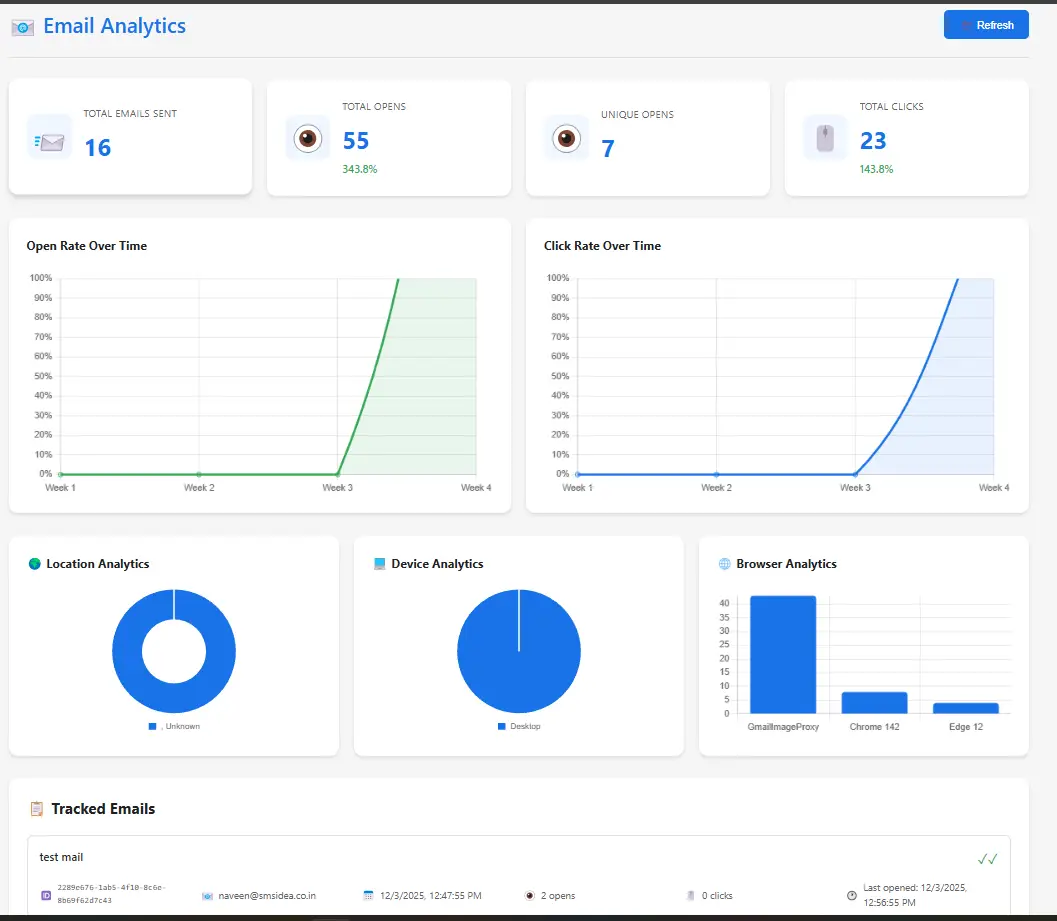
Email Analytics
- Total Opens
- Unique Opens
- Total Clicks
- Open Rate Over Time
- Click Rate Over Time
- Location Analytics
- Device Analytics
- Browser Analytics
- Tracked Emails

About Track - The most powerful email tracking solution for Gmail
Engineered for Clarity
Open Receipts
Link Tracking
Deep Analytics
Location Data
Device Insights
Privacy First
How Gmail Email Tracking Works
1. Install the Gmail tracking extension
Install Jalpi’s email tracking extension and connect it with Gmail.
2. Send your email
Compose and send your email normally from Gmail.
3. Track email opens
Receive information when your email is opened, where supported.
4. Track link clicks
See which links recipients interact with.
5. Analyze engagement
Use the dashboard to understand opens, clicks, devices, browsers, and location insights.
Email Location Tracking: What Can You See?
Jalpi’s email tracking provides location insights alongside email engagement data. Depending on the tracking environment, you may be able to see an approximate city or country associated with an email interaction. Location information is not guaranteed to represent a recipient’s exact physical location and can be affected by VPNs, proxies, mobile networks and privacy protections.
Frequently Asked Questions
Gmail email tracking allows you to see when recipients interact with your emails, including email opens and link clicks. Jalpi also provides engagement, device, browser, and location insights.
Yes. Jalpi’s Gmail email tracking extension can notify you when a tracked email is opened, where tracking is supported.
Email tracking may provide approximate location information associated with an email interaction. Jalpi provides city and country-level location insights, but this should not be considered an exact physical location.
Yes. Jalpi tracks interactions with links in your emails, allowing you to understand which links recipients click.
Yes. Salespeople can use email tracking to understand whether prospects are engaging with their emails and links, helping them decide when and how to follow up.