





























































Architecture
A comprehensive technical guide to the architecture of Jalpi Page Builder: the decoupled contract between the React/TypeScript visual editor and the PHP frontend renderer, the immutable node tree, state management, storage schemas, two-phase rendering, security models, and extension surfaces.
Architecture Overview#
Jalpi Page Builder is fundamentally designed as two decoupled codebases that never call each other directly:
- The Visual Editor: A modern, high-performance React 18 and TypeScript single-page application executing client-side in
wp-admin. It manages an interactive visual canvas, a hierarchical tree navigator, global design tokens, and site-wide class libraries, serializing user actions into an immutable JSON document (PageData). - The Frontend Renderer: A high-throughput PHP 8 engine executing on the WordPress public request lifecycle. It ingests the JSON document from the database and compiles it into semantic HTML, scoped CSS stylesheets, and conditional JavaScript assets.
Neither environment imports the other. The only bridge between them is the strictly validated JSON data contract and a handful of deliberately mirrored schema constants.
The Two-World Paradigm: React Editor & PHP Renderer
This strict boundary provides immense architectural advantages:
- Zero Frontend Overhead: React, ReactDOM, and builder UI bundles are never enqueued on the public frontend. Visitors download only ultra-lean compiled HTML and CSS.
- Bulletproof Security: User input is sanitized by a complete rebuild pass at the REST API boundary before anything touches the database. The frontend renderer operates on pre-sanitized structures and applies contextual output escaping via
wp_kses(). - Predictable State: The editor treats page content as a deterministic tree of headless nodes. Undo/redo, template imports, and class styling operate purely on plain JSON data without DOM mutation side-effects.
System Layers & Responsibilities
| Layer | Source Location | Primary Responsibility |
|---|---|---|
| Editor UI | admin/editor/src/components/ | Canvas interaction, toolbar controls, inspector panels, modal dialogs, and drag-and-drop feedback. |
| Editor State | admin/editor/src/store/editorStore.ts | Holds PageData, active selection, viewport zoom, responsive breakpoint, history stack, and design tokens. |
| Transport | admin/editor/src/hooks/useApi.ts | Type-safe asynchronous client communicating with jalpi-page-builder/v1 using WordPress REST nonces. |
| REST API | includes/class-jalpi-*.php | Routes, authenticates, authorizes, and handles CRUD operations for pages, classes, templates, revisions, and media. |
| Validation | includes/class-jalpi-sanitizer.php | Rebuilds incoming node trees from scratch, stripping unwhitelisted keys, invalid types, duplicate IDs, and excessive nesting. |
| Storage | {prefix}jalpi_pages, {prefix}jalpi_classes | Custom high-performance MySQL tables storing JSON document trees keyed by post ID or class key. |
| Renderer | includes/class-jalpi-renderer.php | Traverses the node tree, dispatches to element classes, accumulates CSS rules, and compiles final HTML/CSS. |
| Dynamic Resolution | includes/class-jalpi-dynamic-tags.php | Late-binds WordPress context (post titles, featured images, ACF/MetaBox custom fields, author data) at request time. |
| Theme Layer | includes/class-jalpi-theme-builder.php | Intercepts WordPress template hierarchy via template_include, wp_body_open, and wp_footer for headers, footers, singles, and archives. |
Architecture Diagram#
The following diagram illustrates the complete bidirectional data flow across the WordPress environment, the client-side editor, the storage layer, and the frontend rendering engine:
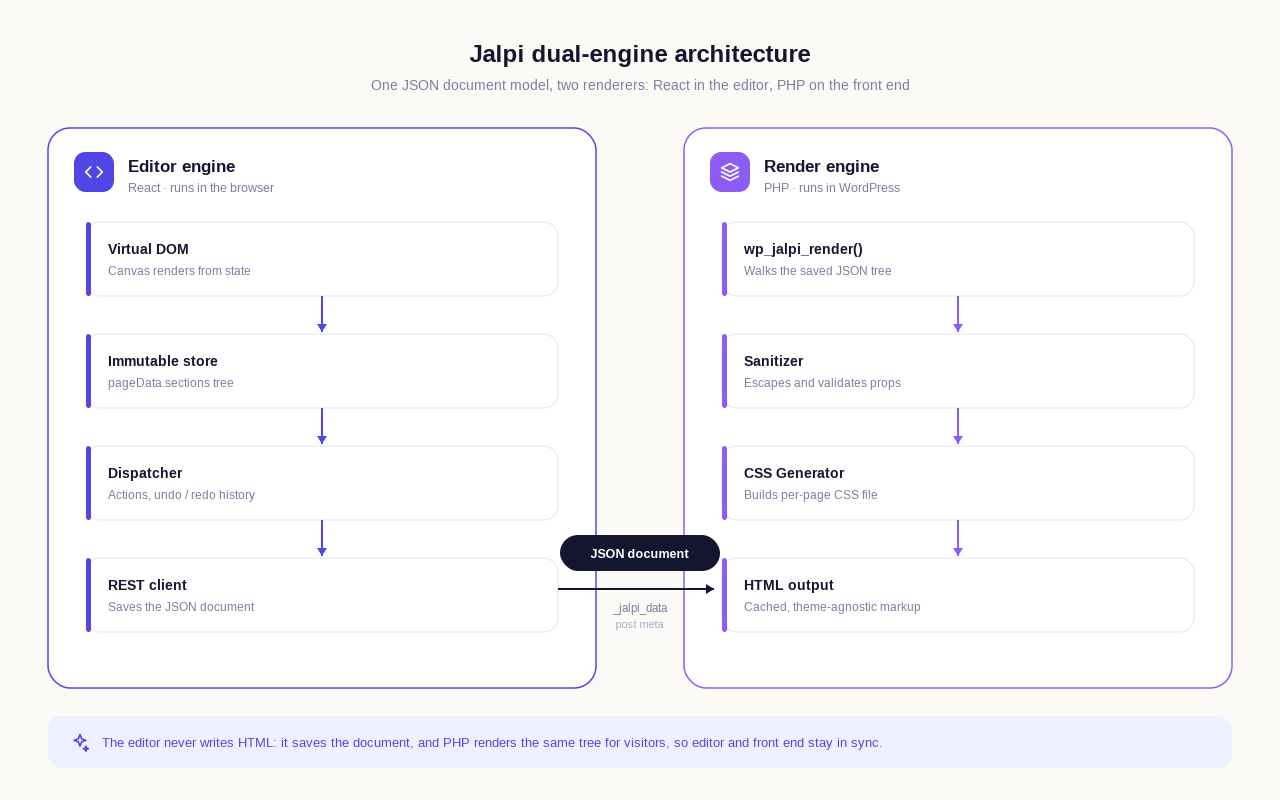
┌──────────────────────────────────────────────────────────────────────────────────────────┐
│                                   WORDPRESS CORE (PHP 8)                                 │
│  ┌─────────────────────────┐   ┌──────────────────────────┐   ┌───────────────────────┐  │
│  │ jalpi-page-builder.php  │──▶│ Jalpi_Activator / Tables │──▶│ jalpi_init() Bootstrap│  │
│  └─────────────────────────┘   └──────────────────────────┘   └───────────────────────┘  │
└────────────────────────────────────────────┬─────────────────────────────────────────────┘
                                             │ Enqueues Editor App with jalpiEditorConfig
                                             ▼
┌──────────────────────────────────────────────────────────────────────────────────────────┐
│                             CLIENT-SIDE EDITOR (React 18 / TS)                           │
│  ┌────────────────────────────────────────────────────────────────────────────────────┐  │
│  │ App.tsx (Shell)                                                                    │  │
│  │  ├── TopBar (Undo/Redo, Breakpoint: Desktop/Tablet/Mobile, Zoom, Save/Publish)     │  │
│  │  ├── Canvas (Canvas.tsx ──▶ CanvasNode.tsx recursive tree rendering)               │  │
│  │  ├── Navigator (LayersPanel.tsx hierarchical element outline & drag-reorder)       │  │
│  │  └── Inspector (PropertiesPanel: Content/Style/Advanced, GlobalStyles, Classes)    │  │
│  └─────────────────────────────────────────┬──────────────────────────────────────────┘  │
│                                            │ Mutations via useEditorStore                │
│                                            ▼                                             │
│  ┌────────────────────────────────────────────────────────────────────────────────────┐  │
│  │ State: PageData { version, globalStyles, sections: [ CBNode ... ] }                 │  │
│  │ Immutable History (30 steps) ──▶ Debounced Autosave (3s) ──▶ useApi.ts             │  │
│  └─────────────────────────────────────────┬──────────────────────────────────────────┘  │
└────────────────────────────────────────────┼─────────────────────────────────────────────┘
                                             │ HTTP POST /wp-json/jalpi-page-builder/v1/page
                                             │ X-WP-Nonce + Cookie Auth
                                             ▼
┌──────────────────────────────────────────────────────────────────────────────────────────┐
│                                 SERVER BOUNDARY & STORAGE                                │
│  ┌────────────────────────────────────────────────────────────────────────────────────┐  │
│  │ Jalpi_API::save_page() ──▶ Permission Check (current_user_can('edit_post'))        │  │
│  │                              │                                                     │  │
│  │                              ▼                                                     │  │
│  │ Jalpi_Sanitizer::sanitize_page_data()                                              │  │
│  │  ├── Drops unknown element types                                                   │  │
│  │  ├── Enforces unique node IDs & prevents circular references                       │  │
│  │  └── Truncates depth >= 20 (Stack Overflow guard)                                  │  │
│  │                              │                                                     │  │
│  │                              ▼                                                     │  │
│  │ MySQL Atomic Update: wp_jalpi_pages (page_data JSON, version++)                    │  │
│  │ Invalidate Render Transients & Bump jalpi_classes_version                          │  │
│  └────────────────────────────────────────────────────────────────────────────────────┘  │
└────────────────────────────────────────────┬─────────────────────────────────────────────┘
                                             │ Public Frontend HTTP Request
                                             ▼
┌──────────────────────────────────────────────────────────────────────────────────────────┐
│                               FRONTEND RENDER ENGINE (PHP)                               │
│  ┌────────────────────────────────────────────────────────────────────────────────────┐  │
│  │ Phase 1: wp_enqueue_scripts (Jalpi_Renderer::enqueue_frontend_assets)              │  │
│  │  ├── Loads PageData JSON from wp_jalpi_pages                                        │  │
│  │  ├── Pre-renders tree to HTML string ($prerendered_html)                           │  │
│  │  ├── Compiles CSS (Class rules first, then Node rules, then Responsive media)      │  │
│  │  ├── Injects CSS via wp_add_inline_style('jalpi-frontend', $compiled_css)          │  │
│  │  └── Enqueues Google Fonts & jalpi-frontend.js (only if interactive widgets used)   │  │
│  ├────────────────────────────────────────────────────────────────────────────────────┤  │
│  │ Phase 2: the_content / template_include (Priority 99)                              │  │
│  │  ├── Strips wpautop / wptexturize                                                  │  │
│  │  ├── Resolves Dynamic Tags ({{post_title}}, {{featured_image_url}})                │  │
│  │  └── Emits pre-rendered HTML escaped through wp_kses(..., allowed_html)            │  │
│  └────────────────────────────────────────────────────────────────────────────────────┘  │
└──────────────────────────────────────────────────────────────────────────────────────────┘
Editor Architecture#
The visual editor in admin/editor/src/ is bootstrapped by index.tsx and mounted into the WordPress administration page rendered by Jalpi_Editor::render_editor_page(). The PHP layer injects window.jalpiEditorConfig containing API nonces, post metadata, user capabilities, Google Font lists, and design system defaults.
Editor Shell & Layout Structure
The primary container component is App.tsx, which establishes a responsive CSS grid layout divided into three main operational zones:
- Top Bar (Header):
- Document title and post status indicator.
- History controls (Undo / Redo with live state labels).
- Responsive Viewport Switcher (Desktop 100%, Tablet 1024px, Mobile 375px/767px).
- Canvas Zoom controls (50% to 150% in 10% steps).
- Preview mode toggle and Navigator / Layers toggle.
- Save Draft, Revision History modal trigger, and Publish buttons.
- Central Workspace: Hosts the visual
Canvas.tsxviewport and contextual overlays (command palette, context menu, floating node toolbar). - Right-Hand Inspector Sidebar: Hosts tabbed operational panels controlling every level of design.
Inspector Panels Suite
LayersPanel.tsx (Outline)
Hierarchical tree representation of all sections, containers, columns, and widgets. Provides drag-and-drop reordering, layer locking, and hide-on-device toggles.
PropertiesPanel.tsx (Style)
Contextual controls for the selected element divided into Content, Style, and Advanced tabs. Embeds the ClassPicker chip picker and InheritedBadge indicators.
GlobalStylesPanel.tsx (Global)
Direct editing suite for the site Design System: color palettes, typography scales, border radii, elevation shadows, and container width tokens.
ClassesPanel.tsx (Classes)
Site-wide manager for reusable CSS classes: live substring search, priority reordering, favorites, duplication, export, and protected deletion.
Canvas Architecture#
The visual editing canvas is responsible for rendering the JSON node tree in real time, capturing user selection, and coordinating layout changes.
Viewport Scaling & Canvas Initialization
Canvas.tsx wraps the page rendering tree in a dynamic viewport frame. Depending on the active breakpoint state in the editor store, the viewport frame width adjusts smoothly:
- Desktop: 100% fluid container width.
- Tablet: Fixed width of
1024px(or the custom value configured inJalpi_Settings). - Mobile: Fixed width of
375pxwith a max-width boundary of767px.
When the user changes the canvas zoom level, CSS transform scale(zoom / 100) is applied to the canvas root with transform-origin: top center, allowing pixel-perfect previewing of expansive desktop sections on smaller laptop displays.
Recursive Node Rendering & Manipulation
Page rendering is executed by CanvasNode.tsx, which walks the sections array recursively:
- Container Elements (Section, Container, Column): Render their HTML wrapper, compile their background/border styles, and render nested drop zones for their
childrenarray by recursively calling<CanvasNode />. - Leaf Elements (Heading, Text, Button, Image, etc.): Dispatch to their registered component view or to
GenericRenderer.tsxfor schema-driven widgets. - Selection Highlight: When a node's ID matches
state.selectedId,CanvasNodeattaches an active blue selection bounding box and positionsFloatingToolbar.tsxdirectly above the element with quick actions (Move Up, Move Down, Duplicate, Delete, Add Element).
Element Architecture#
In Jalpi Page Builder, every piece of page content—from a top-level Section down to an inline Icon—is represented by a single unified TypeScript interface: CBNode.
The CBNode Interface & Schema
The complete data contract defined in admin/editor/src/types/index.ts:
export interface CBNode {
  id: string;                                          // Unique identifier: e.g. "heading_w8f2a1b"
  type: ElementType;                                   // Registered widget type: "heading", "container", etc.
  content?: NodeContent;                               // Widget-specific text, URLs, icons, or attributes
  styles?: StyleMap;                                   // Desktop CSS declarations: fontSize, color, padding
  tabletStyles?: StyleMap;                             // Tablet breakpoint overrides (<= 1024px)
  mobileStyles?: StyleMap;                             // Mobile breakpoint overrides (<= 767px)
  settings?: SectionSettings | ContainerSettings       // Backgrounds, borders, CSS classes, layoutMode
           | Record;
  children?: CBNode[];                                 // Nested child nodes (for containers and columns)
  hideOn?: { desktop?: boolean; tablet?: boolean;      // Viewport visibility toggles
             mobile?: boolean };
  locked?: boolean;                                    // Prevents accidental edits or drag operations
  globalStyleRef?: {                                   // Design system token references
    typographyId?: string;
    buttonId?: string;
    tokens?: Record;
  };
  interactions?: InteractionRule[];                    // Animation and scroll interaction triggers
}
Content, Settings & Style Maps
To ensure strict architectural purity, node properties are separated into three orthogonal buckets:
content: Semantic data. For a Heading, this holds{ text: "Hello", tag: "h2" }. For an Image, it holds{ url: "...", alt: "..." }. This data never contains CSS properties.styles: Pure visual CSS properties (typography, colors, margins, paddings, flex dimensions) stored as camelCase key-value pairs (e.g.{ fontSize: "32px", marginTop: "16px" }).settings: Structural and layout properties, includinglayoutMode(flex vs grid), container widths, background datasets (bgNormal,bgHover), border datasets (borderNormal,borderHover), CSS ID, and attached Global Class keys (cssClasses: ["cls_9f3a1b2c"]).
State Management#
Editor state is centralized in admin/editor/src/store/editorStore.ts via the custom hook useEditorStore. Jalpi uses a single immutable state pattern.
The EditorStore Hook & Immutable Tree
The state object represents the entire active editor session:
export interface EditorState {
  pageData: PageData;             // Current document: { version, globalStyles, sections }
  selectedId: string | null;      // Currently active node ID for properties inspection
  panelTab: 'content' | 'style'   // Active tab inside PropertiesPanel
          | 'advanced';
  inspTab: 'outline' | 'style'    // Active main inspector tab
         | 'page' | 'global'
         | 'classes';
  breakpoint: Breakpoint;         // Active device viewport: 'desktop' | 'tablet' | 'mobile'
  zoom: number;                   // Canvas zoom level: 50 - 150
  showLayers: boolean;            // Floating Navigator visibility toggle
  isDirty: boolean;               // True when unpersisted changes exist
  isSaving: boolean;              // Background save in progress
  isPublishing: boolean;          // Publish request in progress
  classes: JalpiClass[];          // Loaded site-wide Global Classes
  editingClassKey: string | null; // Class currently open in ClassStyleEditorModal
  designSystem: DesignSystem;     // Active site design tokens
  history: HistoryEntry[];        // Undo/redo snapshot stack
  historyIndex: number;           // Pointer to current history snapshot
}
State mutations are executed via pure helper functions such as updateNodeInTree(). When an element style is adjusted, a new node tree is constructed immutably. Components subscribing to state re-render efficiently without stale state leaks.
History & Time-Travel Undo/Redo Engine
Jalpi maintains an internal time-travel history stack capped at MAX_HISTORY = 30 entries:
- Whenever a user performs a destructive or layout-altering action (adding a widget, deleting an element, updating styles, reordering containers, or attaching a class),
mkHistory()clones the document viacloneDeep(newData)and appends a labelledHistoryEntry. - Calling
store.undo()decrementshistoryIndexand replacespageDatawith the preceding snapshot. - Calling
store.redo()incrementshistoryIndexand restores the forward state. - Undo/Redo operations can be triggered via TopBar buttons or global keyboard shortcuts (Ctrl+Z / Cmd+Z and Ctrl+Shift+Z / Cmd+Shift+Z).
Data Flow#
From an interactive slider adjustment in the browser down to the HTML bytes delivered to a website visitor, data flows through ten distinct, strictly sequential phases:
The 10-Step End-to-End Lifecycle
- User Interaction: The user adjusts a control in the editor (e.g. changing button padding or moving a column).
- Store Mutation:
editorStoreupdates the node immutably, setsisDirty: true, and records a history snapshot with an action label (e.g. "Update Styles"). - Canvas Reactivity: React triggers a re-render of
CanvasNode.tsx; the visual canvas updates immediately. - Debounced Autosave:
App.tsxruns an effect that waits 3,000 milliseconds of inactivity (or user presses Ctrl+S / Save Draft), then initiates transport. - REST Transport:
useApi.savePage(postId, pageData)issues aPOSTrequest to/wp-json/jalpi-page-builder/v1/page/{postId}carrying the JSON payload and theX-WP-Nonceheader. - Authorization & Route Guard: WordPress verifies the REST nonce and executes
Jalpi_API::check_edit_permission(), confirmingcurrent_user_can('edit_post', $postId). - Server Sanitization:
Jalpi_Sanitizer::sanitize_page_data()recursively inspects the tree, discarding unwhitelisted keys, invalid element types, duplicate IDs, and nesting deeper than 20 levels. - Atomic Persistence:
Jalpi_API::save_page()executes an atomic SQL statement updatingwp_jalpi_pages, incrementingversion = version + 1, and creating an automatic revision inwp_jalpi_revisions. - Cache Evacuation: The server sets the post meta flag
_jalpi_has_canvas_data = 1and deletes the render transient key (jalpi_render_{id}_...). - Frontend Compilation & Delivery: On the next visitor request,
Jalpi_Renderer::enqueue_frontend_assets()pre-renders the tree duringwp_enqueue_scripts, compiles and deduplicates CSS, and injects clean, sanitized HTML intothe_content.
Storage Architecture#
Unlike page builders that store bloated shortcodes inside wp_posts.post_content, Jalpi adopts a dedicated relational storage model optimized for speed, versioning, and crash resilience.
Custom Database Tables Schema
Jalpi creates four dedicated tables during activation via Jalpi_Activator::maybe_upgrade():
| Table Name | Primary Key | Key Columns | Purpose |
|---|---|---|---|
{prefix}jalpi_pages | post_id (BIGINT) | page_data (LONGTEXT), version (INT), created_at, updated_at | Primary document store for all canvas pages and theme builder templates. Contains raw JSON tree. |
{prefix}jalpi_classes | id (BIGINT) | class_key (VARCHAR 64 UNIQUE), name, styles (LONGTEXT), favorite, sort_order | Centralized library for reusable site-wide Global Classes. |
{prefix}jalpi_revisions | id (BIGINT) | post_id, page_data (LONGTEXT), title, created_by, created_at | Historical snapshots created on every manual or autosave operation for rollback support. |
{prefix}jalpi_templates | id (BIGINT) | title, type (block, page), page_data (LONGTEXT), thumbnail, created_at | Local user template library storing exported reusable blocks and section wireframes. |
CPTs, Post Meta & WordPress Options
- Theme Builder CPT:
jalpi_theme_tplis a private custom post type (public => false,show_ui => false) registered specifically for theme templates (headers, footers, singles, archives). Template content is stored inwp_jalpi_pagesunder the template's post ID. - Fast-Path Meta Flag:
_jalpi_has_canvas_datais stored inwp_postmeta. Both the frontend enqueue hook andthe_contentfilter check this boolean first, ensuring non-Jalpi pages cost zero queries againstwp_jalpi_pages. - Theme Builder Meta:
_jalpi_tpl_location,_jalpi_tpl_status,_jalpi_tpl_priority, and_jalpi_tpl_conditions. - Core Options:
jalpi_settings: Global editor configuration (breakpoints, enabled post types, Google Fonts API key).jalpi_design_system: JSON snapshot of site-wide colors, typography presets, button presets, and spacing tokens.jalpi_classes_version: Monotonically increasing integer used for instantaneous global transient cache busting.
Serialization#
Because the entire node tree round-trips between client and server as JSON, serialization hygiene is critical to architectural stability.
JSON Serialization & Safe Deserialization
Every piece of data inside CBNode must be strictly JSON-serializable. Functions, class instances, Date objects, Sets, Maps, and undefined values are strictly prohibited. In JavaScript, history cloning uses JSON.parse(JSON.stringify(pageData)); in PHP, persistence uses wp_json_encode() and read paths use json_decode($json, true).
Backward Compatibility & Field Mapping
To prevent legacy saved pages from breaking as the editor evolves, deserialization routines incorporate automatic field mapping:
- Container Layout Modes: Older versions stored container column settings under
columns,gap,direction, andjustifyContent.CanvasNode.tsxandJalpi_Element_Containerdetect these legacy keys and automatically map them to modernlayoutMode: 'flex' | 'grid',flexDirection, andflexGapproperties. - Icon Migration: Older icon settings placed visual properties inside
node.content. Modern versions migrate these tonode.styleswhile reading legacy keys seamlessly.
Rendering#
The PHP rendering engine (Jalpi_Renderer) is designed for extreme performance, generating zero redundant styles and avoiding mid-page CSS injection.
The Two-Phase Render Pipeline
- Phase 1 — Pre-render During Enqueue (
wp_enqueue_scripts):- Executes early in the WordPress lifecycle before
<head>is printed. - Loads the page's JSON document and initializes accumulators (
reset_state()). - Renders the entire node tree into an in-memory HTML buffer (
$prerendered_html). - Compiles all accumulated desktop, tablet, and mobile CSS rules.
- Attaches the CSS to the pre-registered
jalpi-frontendhandle viawp_add_inline_style(), ensuring clean delivery in the document<head>without FOUC (Flash of Unstyled Content). - Enqueues Google Fonts and icon libraries actually used on the page.
- Checks interactive flags; if no widgets require JS,
jalpi-frontend.jsis omitted entirely.
- Executes early in the WordPress lifecycle before
- Phase 2 — Emission in
the_content(Priority 99):- Intercepts the standard WordPress content filter.
- Removes WordPress filters
wpautopandwptexturizeto prevent accidental paragraph mangling. - Emits the pre-rendered HTML buffer safely escaped through
wp_kses().
Element Dispatch & Schema Fallback
When Jalpi_Renderer encounters a node, it routes the node through render_node():
public function render_node( $node ) {
    $node = $this->resolve_token_refs( (array) $node );
    $type = $node['type'] ?? '';

    $html = isset( $this->elements[ $type ] )
        ? $this->elements[ $type ]->render( (array) $node, $this )
        : '';

    $this->maybe_add_responsive_rules( $node );
    $this->maybe_add_custom_css( $node );
    $this->maybe_add_interaction_css( $node );
    return $this->apply_interactions( $node, $html );
}
The renderer maintains 48 explicit element classes (e.g. Jalpi_Element_Heading, Jalpi_Element_Container). If an element type is not explicitly implemented in PHP, it falls back to Jalpi_Element_Generic, which renders widgets driven purely by declarative JSON schemas from includes/widgets-schema.php.
The CSS Accumulation Model
CSS rules are never printed inline inside widget markup. They are accumulated during tree traversal into separate buckets:
private function compile_css() {
    $this->compile_class_css(); // Compiles .card-shadow, .btn-primary, etc.

    // 1. Class CSS rules emitted FIRST
    $css  = implode( '', array_unique( $this->class_css_rules ) );
    // 2. Node/Inline CSS rules emitted SECOND (guarantees inline overrides class)
    $css .= implode( '', array_unique( $this->css_rules ) );

    // 3. Tablet Media Query Block
    if ( $tablet_css ) { $css .= "@media(max-width:{$tablet_bp}px){{$tablet_css}}"; }
    // 4. Mobile Media Query Block
    if ( $mobile_css ) { $css .= "@media(max-width:{$mobile_bp}px){{$mobile_css}}"; }

    return $css;
}
Security & Sanitization#
Jalpi enforces defense-in-depth across both input and output boundaries. For complete schema details, visit Security & Sanitization.
Rebuild-at-Boundary Defense
Rather than attempting to filter malicious fragments out of an incoming document, Jalpi_Sanitizer rebuilds the node tree from scratch. It instantiates an empty object and copies only whitelisted keys through strict sanitizers:
- Unknown Types: Any node with an unapproved
typeis completely dropped. - ID Validation: Nodes lacking an
idare dropped. Every ID must match[a-zA-Z0-9_-]. - Circular Reference Guard: Tracks
$seen_idsin a set. If an ID appears more than once, the duplicate is dropped immediately, preventing infinite recursive loops. - Depth Clamp: Trees deeper than
MAX_DEPTH = 20levels are truncated, guarding against server stack overflows.
Output Escaping & Extended allowed_html
Rendered HTML passes through wp_kses() using Jalpi_Renderer::allowed_html(). This extends standard wp_kses_allowed_html('post') with attributes builder widgets depend on:
- Universal attributes:
class,style,id,tabindex. - Accessibility & State: All standard
aria-*attributes androle. - Data attributes:
data-*(used by carousels, split-text, counters, and interactions). - SEO & Microdata:
itemscope,itemtype,itemprop,itemid,itemref.
REST API Integration#
All communication between the React editor and WordPress flows through standard WordPress REST API routes registered under namespace jalpi-page-builder/v1. For complete endpoint specs, visit REST API Documentation.
Transport Layer & Nonce Authentication
Requests require active WordPress cookie session authentication and an X-WP-Nonce header. Nonce verification and capability checks (current_user_can('edit_post') or edit_theme_options) are enforced in the permission_callback of every registered route before controllers execute.
Resource Endpoints Summary
| Resource | Route Prefix | Key Operations |
|---|---|---|
| Pages | /page/{id} | Load page data (GET), Save page data (POST), Publish canvas to post_content (POST /publish/{id}). |
| Global Classes | /classes | List, Create, Update (PATCH), Delete, Duplicate, Toggle Favorite, Usage count, Reorder, Export, Import. |
| Templates | /templates | List local templates, Save block/page template, Delete template, Export/Import starter kits. |
| Theme Templates | /theme-templates | CRUD for headers, footers, singles, archives, search, and 404 theme templates. |
| Revisions | /revisions/{id} | List past page revisions, restore revision snapshot, delete revision history. |
| Design System | /design-system | Read and update site-wide design tokens (colors, typography presets, spacing). |
Hooks & Extension Points#
Jalpi exposes granular action and filter hooks throughout its lifecycle. For complete argument references, visit Hooks & Extension Points.
Core Actions & Filters Matrix
| Hook Name | Type | When Fired / Purpose |
|---|---|---|
jalpi_before_compile_class_css | Filter | Filters compiled global class CSS string before it is combined with element rules. |
jalpi_valid_dynamic_tags | Filter | Registers custom dynamic tag identifiers (e.g. my_custom_tag). |
jalpi_internal_editor_post_types | Filter | Allows internal custom post types (like jalpi_theme_tpl) to be edited in the canvas editor. |
jalpi_theme_builder_template | Filter | Overrides active theme template resolution based on dynamic runtime logic. |
jalpi_class_saved | Action | Fires whenever a Global Class is created, updated, duplicated, or favorited. |
jalpi_class_deleted | Action | Fires when a Global Class is deleted from the database. |
jalpi_theme_template_rendered | Action | Fires immediately after a theme builder template completes rendering. |
Build & Asset Architecture#
Jalpi uses modern frontend build tooling to ensure tiny asset sizes and zero render-blocking penalties.
Vite Compilation & Conditional Asset Loading
- Editor Bundle: The React app in
admin/editoris bundled using Vite with TypeScript compilation intoadmin/editor/dist/. Assets are enqueued only on admin pages matchingadmin.php?page=jalpi-page-builder-editor. - Frontend Stylesheet:
assets/css/jalpi-frontend.csscontains baseline resets, flex/grid container primitives, and core widget layouts. It is registered at priority 1 sowp_add_inline_style()can attach page CSS directly to it. - Conditional Frontend Script:
assets/js/jalpi-frontend.jscontains micro-engines for accordion toggles, mobile menus, video popups, and split-text animations. It is only enqueued when interactive widgets set JS flags via$renderer->set_needs_js(). Static pages load zero JavaScript.
Project Structure#
The actual directory layout of the Jalpi Page Builder plugin repository:
jalpi-page-builder/
├── jalpi-page-builder.php           # Plugin entry point: constants, autoloader, boots jalpi_init()
├── uninstall.php                    # Cleanup routine removing tables and options on deletion
├── admin/
│   ├── editor/                      # React 18 / TypeScript visual builder application
│   │   ├── src/
│   │   │   ├── App.tsx              # Main editor shell, header toolbar, inspector router
│   │   │   ├── components/          # Canvas, panels, navigator layers, modals, toolbars
│   │   │   ├── store/editorStore.ts # Centralized immutable state management hook
│   │   │   ├── types/index.ts       # Core CBNode, PageData, and StyleMap TypeScript contracts
│   │   │   ├── hooks/useApi.ts      # Typed REST API transport client
│   │   │   ├── widgets/registry.ts  # Registry definitions for all 48+ widget types
│   │   │   └── utils/designTokens.ts# Design system token mapping and CSS variable utilities
│   │   └── dist/                    # Compiled editor production bundles
│   └── theme-builder/               # Dedicated Theme Builder dashboard interface
├── assets/
│   ├── css/jalpi-frontend.css       # Lean frontend styling and layout primitives
│   ├── js/jalpi-frontend.js         # Conditional interactive runtime script
│   └── fonts/                       # Icon fonts and bundled font assets
├── includes/
│   ├── class-jalpi-activator.php    # DB migration and table installation
│   ├── class-jalpi-api.php          # Page saving, publishing, and revision endpoints
│   ├── class-jalpi-class-manager.php# Global Class data access, caching, and versioning
│   ├── class-jalpi-classes-api.php  # 10 REST endpoints for Global Classes
│   ├── class-jalpi-dynamic-tags.php # Server-side dynamic tag resolution engine
│   ├── class-jalpi-editor.php       # Admin screen controller and editor asset enqueuer
│   ├── class-jalpi-element.php      # Abstract base class for all PHP element renderers
│   ├── class-jalpi-renderer.php     # Two-phase rendering engine and CSS compiler
│   ├── class-jalpi-sanitizer.php    # Recursive node tree rebuild and sanitization
│   ├── class-jalpi-settings.php     # Global settings controller (breakpoints, fonts)
│   ├── class-jalpi-theme-builder.php# Theme builder template injection and condition matching
│   ├── widgets-schema.php           # Declarative schemas for generic widgets
│   ├── trait-jalpi-split-text.php   # Reusable split-text typography trait
│   └── elements/                    # 48 concrete PHP element classes
│       ├── class-jalpi-element-heading.php
│       ├── class-jalpi-element-container.php
│       ├── class-jalpi-element-button.php
│       └── class-jalpi-element-generic.php
├── theme-builder/
│   └── template.php                 # Empty canvas template for single/archive overrides
└── templates/                       # Starter kits and pre-built wireframe definitions
Extension Architecture#
Developers can cleanly extend Jalpi Page Builder without modifying core plugin files:
Building Custom Elements & Dynamic Tags
- Adding a Custom Element with Bespoke Markup:
Create a class extending
Jalpi_Elementinside your custom add-on plugin:Custom Element ExamplePHPclass Custom_Jalpi_Alert extends Jalpi_Element { public static function type(): string { return 'custom-alert'; } public function render( array $node, Jalpi_Renderer $renderer ): string { $text = esc_html( $node['content']['text'] ?? '' ); $attrs = $renderer->get_css_attrs( $node ); // Contribute custom CSS directly to renderer accumulator $renderer->add_css( ".custom-alert { padding: 16px; border-left: 4px solid #6366f1; }" ); return sprintf( '<div class="custom-alert%s"%s>%s</div>', $attrs['extra_cls'], $attrs['id_attr'], $text ); } } - Adding a Custom Dynamic Tag:
Filter
jalpi_valid_dynamic_tagsto register the tag name, and hookjalpi_dynamic_tag_{name}to provide the runtime value:Custom Dynamic Tag FilterPHPadd_filter( 'jalpi_valid_dynamic_tags', function( $tags ) { $tags[] = 'estimated_reading_time'; return $tags; } ); add_filter( 'jalpi_dynamic_tag_estimated_reading_time', function( $value, $param, $post ) { $content = get_post_field( 'post_content', $post->ID ); $words = str_word_count( wp_strip_all_tags( $content ) ); return ceil( $words / 200 ) . ' min read'; }, 10, 3 );
Architecture Roadmap & Coming Soon
The following architectural capabilities are actively planned for future milestones and are currently badged as Coming Soon:
Headless Decoupled API
SoonNative GraphQL and REST endpoints serving pre-compiled headless JSON trees for Next.js and Nuxt frontends.
Runtime Add-on Widget SDK
SoonThird-party plugin widget registration allowing external plugins to load React controls via Module Federation.
Real-Time Collaboration
SoonMulti-user canvas presence and live document editing powered by WebSockets and CRDT synchronization.
Last updated: November 2026