
Chat with us on WhatsApp

Best WhatsApp Business API Service & Pricing | Jalpi

Author name: jalpiadmin

Uncategorized

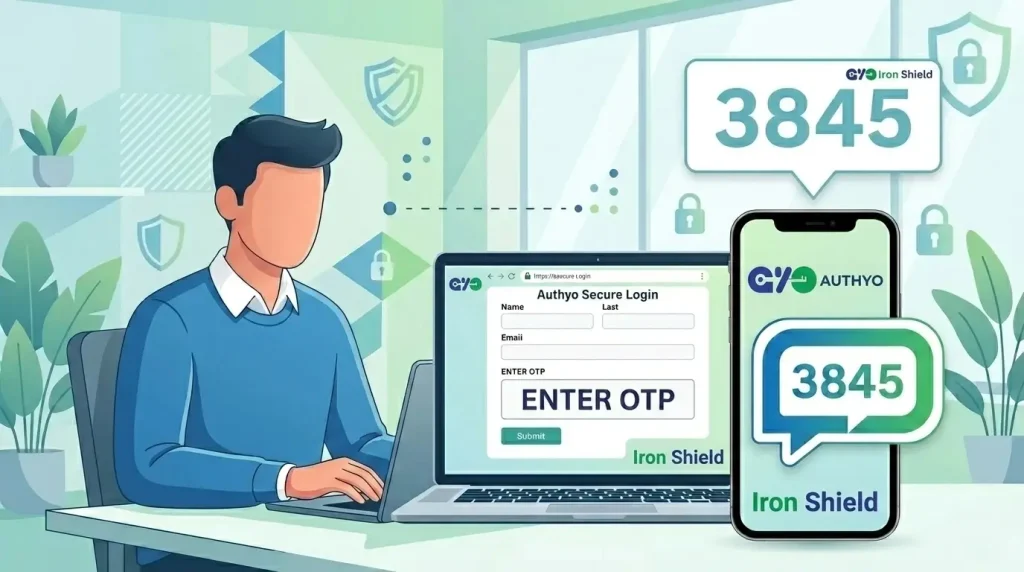
How to Integrate OTP Verification With Your WordPress Forms (Stop Spam and Fake Leads Instantly)

Hi there! 👋 Are you tired of waking up to an inbox full of fake inquiries and spam submissions? If you’ve ever looked at your WordPress dashboard and felt overwhelmed by a sea of generic “test” leads or bot-generated messages, you aren’t alone. In today’s fast-paced digital landscape, lead generation is the lifeblood of any growing business. But there’s a catch: not all leads are created equal. Dealing with “painful decisions” about which leads to follow up on: or worse, wasting hours on piles of paperwork for contacts that don’t even exist: can drain your team’s energy and your marketing budget. That’s where One-Time Password (OTP) verification comes in. By adding a simple verification layer to your WordPress forms, you can ensure that every lead has a valid phone number or email address before they ever hit your database. In this guide, I’ll show you exactly how to use Authyo’s OTP verification plugins—the OTP engine within the broader Jalpi suite by Konceptwise Digital Media Pvt Ltd—to secure your forms and improve lead quality. Authyo handles OTP verification and management, while Jalpi serves as the parent business platform that brings together communication, automation, and operational tools in one unified ecosystem. Let’s dive in! 🚀 The Hidden Cost of “Free” Leads: Why Spam is Killing Your ROI Let’s be real: getting “junk” leads is more than just a nuisance. It’s a silent killer of productivity. When your sales team spends their morning calling disconnected numbers or sending emails that bounce, they aren’t just losing time; they’re losing morale. Here is what happens when you don’t verify your leads: The solution isn’t to stop collecting leads; it’s to start verifying them. By integrating Authyo OTP verification, you move from a “quantity over quality” approach to a seamless, automated workflow that only lets the real customers through. Introducing Jalpi’s 6S Philosophy for Form Security At Jalpi, we don’t just build tools; we build foundations. Authyo is part of the Jalpi suite by Konceptwise Digital Media Pvt Ltd, which means business owners can access trusted WordPress verification plugins powered by Authyo under one unified platform. Jalpi is the broader business management suite, while Authyo is the dedicated engine behind OTP verification and user validation. Our Authyo OTP plugins support popular form builders such as Contact Form 7, WPForms, Ninja Forms, and other supported WordPress form integrations, while staying aligned with Jalpi’s core 6S Philosophy: Technical Prerequisites: What You’ll Need Before we get into the “how-to,” ensure you have the following ready to go. Technical compliance is key to a smooth setup! Step-by-Step Guide: Integrating OTP with Contact Form 7 Contact Form 7 is a staple for WordPress users, but its simplicity can often be exploited by bots. Here is how you can add a layer of Authyo OTP security using the Authyo plugin, available within the broader Jalpi suite: 1. Install the Authyo OTP Plugin Go to your WordPress Dashboard > Plugins > Add New. Search for “Authyo OTP for Contact Form 7” and click Install Now, then Activate. 2. Configure the API Settings Navigate to the Jalpi menu in your WordPress sidebar. 3. Map Your Form Fields You must tell the plugin which field is the “Phone Number” or “Email” field. 4. Enable Verification Toggle the “Enable OTP Verification” switch to On. Save your form. Result: Now, when a user clicks “Submit,” they will see an instant pop-up asking for the 4-digit code sent to their device. Only after entering the correct code will the form actually be submitted to you. Step-by-Step Guide: Integrating OTP with WPForms WPForms is known for its drag-and-drop ease. The Authyo integration, available within the Jalpi suite, is just as intuitive! 1. Activate the Authyo Integration Once the Authyo OTP for WPForms plugin is installed, go to WPForms > All Forms and select the form you want to protect. 2. Add the “Verify” Field In the form builder, look for the “Authyo OTP” field in the left-hand sidebar. Drag and drop it right above your “Submit” button. 3. Customize the Message Under the field settings, you can customize the message your customers see. 4. Test the Flow Always test your form! Open your site in an incognito window, fill out the form, and verify that you receive the OTP. If everything is set up correctly, you’ll see the seamless transition from form filling to verification. Why Choose Authyo for Your WordPress Security? You might be wondering: “Why not just use a standard CAPTCHA?” While CAPTCHAs stop bots, they don’t stop bad data. A human can solve a CAPTCHA and still provide a fake phone number. Authyo’s OTP verification plugins—part of the broader Jalpi suite by Konceptwise Digital Media Pvt Ltd—solve both problems at once. You get a real person with a real contact method, while Jalpi provides the parent platform for broader business management and growth. Beyond verification, the Jalpi ecosystem offers: Stop the Spam, Start Growing The move to an automated, verified workflow isn’t just a technical upgrade; it’s a strategic business move. When you eliminate the noise of spam, you can finally hear the signal of your actual customers. Stop letting fake leads dictate your workday. Take control of your lead quality and give your sales team the verified data they deserve. Ready to secure your forms?👉 Explore Jalpi Pricing and Plans👉 Need help setting up? Visit our Knowledge Base👉 Have a specific requirement? Contact our team today! Boost your efficiency, protect your data, and scale your business with the power of Authyo for OTP verification—backed by Jalpi as the unified parent platform for business tools and operations. Simple. Scalable. Secure.
Insights by Jalpi

WhatsApp AI chatbot guide

Introduction In today’s digital-first world, businesses often face challenges like slow responses, lost leads, and handling customer queries manually. When customers don’t receive quick replies, they quickly lose interest and turn to other options.So, what’s the solution? A Whatsapp Business API Service in India, combined with a WhatsApp AI chatbot, enables businesses to automate conversations, provide instant responses, and manage customer interactions efficiently at scale. It ensures your business stays available 24/7 without adding extra workload. What is a WhatsApp AI Chatbot? A WhatsApp AI chatbot is an automated system that interacts with customers on WhatsApp without human involvement. It uses predefined rules and artificial intelligence to understand queries and provide instant replies. When integrated with WhatsApp API integration, the chatbot can handle thousands of conversations at once. It can answer questions, collect information, and guide users through the buying process.In simple terms, it works like a virtual assistant that is always available for your customers. How WhatsApp AI Chatbots Work with WhatsApp Business API A Whatsapp Business API Service in India allows businesses to connect WhatsApp with automation tools and systems. This is where AI chatbots become powerful. The chatbot is connected to the API and can: Automatically reply to customer messages Send real-time notifications Route conversations to human agents when needed Integrate with CRM systems With platforms like Jalpi, businesses can use advanced WhatsApp automation tools to manage all communication from one dashboard. Key Features of WhatsApp AI Chatbot with Jalpi Jalpi provides a complete WhatsApp chatbot service India with powerful features.The platform enables businesses to automate and scale communication easily. Automation and Instant Replies The chatbot responds instantly to customer queries. This reduces waiting time and improves user experience. Multi-Agent Support Multiple team members can manage chats together. This is useful for customer support teams handling large volumes. Analytics and Insights Track performance, response time, and engagement. This helps improve your communication strategy. CRM and API Integration Jalpi offers smooth WhatsApp API integration with your existing systems, making data management easier. Key Use Cases of WhatsApp AI Chatbots Businesses across industries are using WhatsApp AI chatbots in different ways. For lead generation, chatbots can capture customer details and qualify leads automatically. This helps businesses respond faster and close more deals. For customer support, chatbots answer common questions instantly, reducing workload on support teams. For order updates, businesses can send real-time notifications like order confirmation, shipping updates, and delivery alerts. For appointment booking, customers can schedule meetings or services directly through WhatsApp. For marketing campaigns, businesses can use WhatsApp marketing automation and bulk WhatsApp messaging to send offers, promotions, and updates. Benefits of WhatsApp AI Chatbots for Businesses Using a WhatsApp AI chatbot provides several advantages. Businesses can offer instant replies, ensuring no customer is left waiting. This improves customer satisfaction. It reduces operational costs because fewer human agents are needed for basic queries. It enables personalized communication, which increases engagement and trust. It also improves efficiency by handling multiple conversations at once.  Overall, it helps businesses grow faster and serve customers better. How AI Chatbots Drive Business Growth in 2026 In 2026, automation is no longer optional—it is essential. AI chatbots help businesses scale without increasing costs. They ensure 24/7 availability, capture more leads, and improve conversion rates. With growing competition, businesses using WhatsApp automation tools gain a clear advantage. They can respond faster, engage better, and close more sales.  Automation is the key to staying ahead. Why Choose a Whatsapp Business API Service in India like Jalpi Choosing the right provider is important for success. Jalpi offers a reliable and efficient WhatsApp API provider India solution designed for modern businesses. With Jalpi, you get: Fast and easy setup  Advanced automation and chatbot features  Affordable pricing plans  Seamless integration with your systems  Dedicated support and guidance  Jalpi helps you automate communication and improve customer engagement effortlessly. Manual communication is no longer enough for growing businesses. Customers expect quick responses and smooth interactions. A Whatsapp Business API Service in India with AI chatbot support helps you automate conversations, improve response time, and increase engagement. It is the future of customer communication in 2026 and beyond. Get Started with Jalpi Today (Call to Action) Want to automate your customer communication and increase conversions? Get started with Jalpi’s Whatsapp Business API Service in India today. Automate chats  Send instant notifications  Capture and convert more leads   Book a demo now and see how AI chatbots can transform your business.

Insights by Jalpi

What is WhatsApp Business API? Complete Guide (2026) Introduction

In today’s fast-paced digital world, businesses often struggle with slow customer communication and low engagement. Customers expect quick replies, instant updates, and smooth interactions. But managing all this manually can be difficult. So how can businesses improve communication and respond faster?This is where a Whatsapp Business API Service in India becomes a powerful solution. It helps businesses automate conversations, send updates instantly, and improve customer engagement at scale. What is WhatsApp Business API? WhatsApp Business API is a tool designed for medium and large businesses to communicate with customers on WhatsApp in an automated and scalable way.Unlike the regular WhatsApp Business app, this API allows businesses to: Automate messages  Handle multiple users at once  Integrate with CRM and systems It is widely used by companies looking for WhatsApp API integration and advanced communication solutions.In simple terms, it helps businesses talk to customers faster, smarter, and more efficiently. Difference Between WhatsApp Business App and API The WhatsApp Business app is suitable for small businesses. It works on a single device and has limited features.The WhatsApp Business API, on the other hand, is built for growth.With API, you get: Multi-agent support  Automation and chatbot integration  Bulk messaging capabilities  Advanced analytics This makes it ideal for businesses using WhatsApp automation tools and looking to scale communication. Key Features of WhatsApp Business API The WhatsApp Business API comes with powerful features that help businesses improve communication. Automation and Chatbots Businesses can use WhatsApp chatbot service to automatically reply to customer queries. This reduces response time and improves customer experience. Bulk Messaging With bulk WhatsApp messaging, businesses can send offers, updates, and alerts to thousands of customers at once. Multi-Agent Support Multiple team members can manage chats from a single dashboard. This is useful for customer support teams. Analytics and Insights Track message performance, response time, and engagement. This helps improve communication strategies. How Businesses Use WhatsApp Business API Businesses across industries use WhatsApp API for different purposes. Analytics and Insights Send offers, discounts, and campaigns using WhatsApp marketing automation. This increases customer engagement and conversions. Analytics and Insights Provide instant replies and resolve queries quickly using chatbots and live agents. Analytics and Insights Send real-time updates like: Order confirmations  Delivery status Appointment reminders Lead Generation and Sales Capture leads directly on WhatsApp and guide them through the sales process. Benefits of Using WhatsApp Business API Using a Whatsapp Business API Service in India offers several advantages. Faster CommunicationRespond instantly to customer queries  Higher EngagementWhatsApp messages have high open rates  Cost-EffectiveReduce dependency on calls and SMS  AutomationSave time with automated workflows  Better Customer ExperienceProvide real-time interaction   It helps businesses grow faster and communicate better. Why Choose a Whatsapp Business API Service in India like Jalpi Choosing the right provider is important for success. Jalpi offers a reliable WhatsApp API provider India solution with advanced features.  What You Get: Fast and easy setup  Seamless WhatsApp API integration  Advanced automation tools  Chatbot and bulk messaging support  Dedicated support and guidance   Jalpi helps businesses automate communication and improve customer engagement effortlessly. The Smarter Way to Connect with Customers Customer communication is the key to business growth. Manual messaging is no longer enough. A Whatsapp Business API Service in India helps you automate conversations, improve response time, and increase engagement. It is the future of business communication in 2026 and beyond Get Started Today Want to improve your customer communication and boost sales? Get started with Jalpi’s Whatsapp Business API Service in India today. Automate your chats  Send instant notifications  Engage customers better   Book a demo now and see how WhatsApp automation can transform your business.

WhatsApp OTP login WooCommerce notifications
Insights by Jalpi

Jalpi Login and Notifications: WhatsApp OTP & Order Alerts for WooCommerce

Boost customer engagement and secure logins with Jalpi’s WordPress plugin powered by the Official WhatsApp Business API. 👉 Download Jalpi Login and Notifications on WordPress.org 📲 What Is Jalpi Login and Notifications? Jalpi Login and Notifications is a WordPress and WooCommerce plugin that integrates WhatsApp Business API messaging into your online store. It helps merchants: Developed by Konceptwise Digital Media Pvt. Ltd., an official WhatsApp Business Partner, Jalpi is trusted by 65,000+ businesses worldwide and actively powers communication for 3,000+ merchants. 🔔 Automated WhatsApp Notifications for WooCommerce Keep customers informed instantly with WhatsApp order alerts. Jalpi supports notifications for: 🔐 WhatsApp OTP Authentication Enhance security and convenience with WhatsApp OTP login/register: ⚙️ Key Features 🛡️ Privacy & Security Jalpi is designed with privacy‑first architecture: 👉 Read the Jalpi Privacy Policy. ⚡ Installation Guide Shortcodes: 💬 Get Support Need help onboarding or configuring Jalpi? Visit our support page. 🌟 Final Takeaway With Jalpi Login and Notifications, WooCommerce merchants can deliver real‑time WhatsApp order updates and secure OTP login experiences.

blog-main

The “Best of Both Worlds”: How WhatsApp Coexistence on Jalpi Solves Your Biggest Growth Hurdle

For years, growing your business on WhatsApp meant facing a painful, one-way decision. You started on the free WhatsApp Business App. It was simple, personal, and you managed every customer chat from your phone. But your business grew. You became overwhelmed. You needed chatbots, a multi-agent inbox for your team, and the power to send broadcasts. You needed the WhatsApp Business API. But migrating to the API was a scary, permanent move. You had to give up the simple mobile app interface you loved. You were terrified of losing your chat history. You were stuck, forced to choose between the personal touch of the app and the scalable power of the API. Not anymore. We are thrilled to announce that WhatsApp Coexistence, a revolutionary feature from Meta, is now live on the Jalpi platform. This feature ends the compromise. You can now connect your existing WhatsApp Business App number to the powerful Jalpi API and get the best of both worlds. Here’s how it solves the real-world challenges you face every day. The Challenge: The “Founder’s Dilemma” Meet Priya, an e-commerce store owner. She built her brand by personally handling every customer query on her WhatsApp Business App. Her customers love the personal touch. But Priya is overwhelmed. She’s manually answering “Where is my order?” 50 times a day and can’t keep up with new leads. She wants to use a Jalpi chatbot for 24/7 support and a shared inbox for her new support agent, but she’s terrified of losing the personal app interface she uses to manage VIP clients. The Solution with Jalpi Coexistence: Priya connects her number to Jalpi without leaving the app. Instantly: All messages are perfectly mirrored, or “echoed,” between both platforms. She has scaled her support without sacrificing her personal touch. The Challenge: The “Hybrid Team Problem” Consider a marketing agency. Their sales team uses the Jalpi API to run automated lead-gen campaigns and manage new prospects. But, the CEO manages all high-value “retained clients” on his personal Business App. The sales team has no idea what the CEO is promising, and the CEO has no visibility into new leads. The customer data is siloed, and the experience is disconnected. The Solution with Jalpi Coexistence: The agency enables Coexistence on the CEO’s number. How Does WhatsApp Coexistence Work? The magic is in the “message echoes.” When you enable Coexistence through Jalpi, your phone number is registered with both the Business App and the Cloud API. You have one unified number, one unified history, but two powerful interfaces. Understanding the “Two-Lane” Pricing Model This is the most important part to understand: Coexistence gives you two “lanes” of conversation, each with its own pricing. In short: You only pay for the scalable, automated power that Jalpi provides. Your personal app-to-customer chats remain free. Stop Compromising. Start Scaling. For too long, growing your business on WhatsApp meant making a sacrifice. With WhatsApp Coexistence, that era is over. You can now keep the simplicity of the app you love while seamlessly adding the powerful automation, chatbot, and multi-agent capabilities of Jalpi. Stop turning away customers because you’re overwhelmed. Stop being afraid to scale. It’s time to have the best of both worlds. Ready to enable Coexistence for your business? [Talk to a Jalpi Expert Today] to connect your number in minutes!

Insights by Jalpi

Top 20+ New Year 2025 WhatsApp Message Templates to Send Best Wishes

This New Year 2025, shoppers will either want to celebrate or reflect on their liveliness; thus, it will also be time for small businesses to strike a conversation with customers. WhatsApp is also one medium that is popular yet easy to use for promotion and communication. Creating and sending WhatsApp Message Templates through WhatsApp with festive greetings, what you offer, and more are going to help you a lot in engaging your target market. Best wishes for the New Year 2025 as we joyously compile 20 of the best New Year messages on WhatsApp to engage customers, sell, and deepen customer relationships. In this blog, a plethora of WhatsApp message templates address specific situations and levels of urgency. You can copy and paste these specific messages or fast-pack. What it does is very much tailor-fit all your brand needs. Make the New Year 2025 a worthwhile experience by crafting unique customer interactions over WhatsApp that will lure your customers to Jalpi WhatsApp Business API. What is WhatsApp Message Template for New Year 2025? WhatsApp Message Templates New Year 2025 are means by which messages have been prepared and approved for customer engagement via the WhatsApp Business Platform. By using the names of customers and that of the companies, these messages may be customized. This way, every one of your customers will have a message sent using their name. Additional options would include inserting headers, images, etc. It is effective to use extensively template for internal business message because, otherwise, the business would have to wait for customer response or an earlier message acknowledgments. If that happens, there is a 24-hour countdown to respond using other messages; after that, consumption of the template becomes the only option left. Best 20+ WhatsApp Message Template Ideas for New Year 2025 1. Happy New Year Sales Stirring up the market for your favorite products and welcomes you to Happy New Year 2025 celebrations!!!  SALE on Selected Items is Live Now with 25% off with an express delivery. Get these wonderful offers and discounts and build more new memories. 2. Save up to 60% This New Year 2025. You’ve got it without the glitz of promotional offers and discounts! Visit our NEW YEAR SALE, now running-from today-up to 60% discount and free shipping in delivery. Ends now next week, so hurry! 3. The Limited Offer for New Year BUY 3 & GET 1 FREE! This mad New Year LIMITED TIME OFFER shouldn’t pass you by. Available now: top wear, bottom wear and more! 4. New Year Discount Percentage You will not be able to elude this New Year discount, Sasha. Up to 70% OFF on your desired items! Let the party get started! 5. New Year New Launch Celebrate & star this new chapter with us (user name). New-launched new collection shop. Take your new look from us shop now. 6. Recovery of Abandoned Carts It is a perfect opportunity! Buy From Them this New Year 2025, and you will get an extra product in the order within the next 24 hours. Whatever the case might be for you, they say you have left something in the cart. Get those now and if you order, we will deliver them for you free on New Year 2025. Welcome to the Hunt for Fabulous Deals. This Opportunity Should Not Be Wasted! Hurry up; the offer stands for only the next 48 hours till 31st December, and you will get 15% off any item you buy. 7. Notification for the Restocking of Goods Woohoo! The highly-anticipated [Product Name] is back in stock! There’s no better moment to become its possessor; hurry and place your order! We understand you! To the surprise of many customers, [Product Name] is back in stock due to the high demand. Now, buy your own again before running out of stock again! 8. Loyalty Gift for New Year 2025 Expressing my gratitude to you for the support you have provided over the [Number] years. Just as a courtesy, we are giving you 25% off your next order. Please continue to support us. Thank you for your loyalty over the past [Number] years. As a kind gesture, we present before you a 45% off discount on your next purchase. Thank you for the continued support. 9. Templates for Selling Promotions Through E-commerce 10.Templates for service businesses . 11. Restaurant And Cafe Templates 12. Visit Travel and Hospitality Templates 13.Templates for Fitness & Wellness Best Ways New Year 2025 WhatsApp Marketing Works: New Year 2025 has a worldwide celebration of all the countries. All retail stores have some offers that can be combined with suitable communication appeals for bringing customers in. And these are a few of those reasons that make the New Year 2025 WhatsApp Marketing effectiveness: 1. People have a new enthusiasm for the New Year People are found more spending as the New Year comes in close. All attend parties or get invited to parties for which they have to buy new clothes and many other things. Really, you can induce FOMO by submitting your offers in the templates. 2. People give gifts To each other Just like any other occasion, for the budding New Year in 2025, all the lovebirds would be exchanging gifts to each other in token love. Well, better relationships can turn the sale into attracting more customers during this period of time by giving them leukemia. 3. People take up Resolutions New Year 2025 is a new beginning; in fact, it represents a new energy for all, starting the year afresh. The beginning of a better life finds individuals making resolutions. You can assist in fulfilling them by offering members-only special privileges. FAQs Q.1 Can I edit a WhatsApp New Year Message Template for 2025 after it has received approval? A. It is indeed possible, though, a resubmission would be required for approval. The edited message template cannot then be sent to customers until WhatsApp approves the modifications made by the user. Q.2 What steps need to be

Insights by Jalpi

Choosing the Best WhatsApp Live Chat Software for Your Business

This is now being observed with most of the enterprises moving from their websites’ traditional live chats to WhatsApp live chat. This may largely because of what WhatsApp offers in terms of features and functionalities that help proactivity in customer support. Of all WhatsApp Live Chat apps, which ones will work best for you? We are sharing a post on how to select the best WhatsApp live chat software with this. Essential Aspects for a WhatsApp Live Chat Software Some important features to check before choosing a WhatsApp business chat software:. Closed-loop integration Get a WhatsApp Live Chat Software, say Jalpi, which integrated to the hilt with all existing automated toolset, including CRM systems, helpdesk tools, and eCommerce platforms. Automated responses Opt for integration of live chat systems which also come with AI-enabled automation. This means that you can use WhatsApp automation tools to reduce response times largely and take care of frequently asked questions. Multi-agent support Since the enhancement of your customer support is your top priority now, it’s best that the WhatsApp Live Chat solution you get for your organization allows multiple members of your team to manage conversations and handle queries on one dashboard when needed. Rich media sharing This tool should also be able to share rich and varied media such as images, videos, voice notes, audio documents, etc., to enhance the support experience to become more dynamic and engaging. Personalization This means that the tool would also allow you to personalize replies based on customer data like user behavior, history, preferences, etc., so that you ensure those messages from support never miss. Analytics and reporting An excellent feature of analytics and reporting is when you can gain insights into message performance, response times, and customer satisfaction. This is yet another important feature that should be part of WhatsApp Live Chat Tools-a good analytics and reporting tool. These insights might ultimately help you adapt and change your customer support efforts when the need arises. Always availabilty This should also include WhatsApp automation features that render 24×7 uninterrupted inquiries by customers. Security Customers also have end-to-end encryption as an important feature of their customer’s security. This helps build trust with customers in the area of secure communication. Scalability More queries will come to your business and more conversations of customers will keep coming-in. So it is important that your WhatsApp Live Chat tool be able to handle the increase in conversations effectively. Speedy Setup An ideal tool would possess an easy interface and minimal technicalities to set up and deploy. Integration with other tools and platforms Here’s a few of the key integrations, which a WhatsApp Live Chat tool must include: Manage relations with the customer Now sync your customers’ activities with CRM tools like Salesforce, HubSpot, or Zoho to centralize all customer data in one place, track their history of interactions, and manage your leads more effectively. Hence, this integration serves as a crucial foundation for future follow-ups and personalized support. E-commerce websites Your WhatsApp Chat Tool should also seamlessly integrate with the eCommerce platform you are on – be it Shopify, WooCommerce or Magento, – to be able to send realtime order updates, personalized recommendations, quick issue resolution, etc. Software for Helpdesks To facilitate and streamline the management of customer support tickets, connect your WhatsApp conversations to well-known help desk systems like Zendesk or Freshdesk. Consequently, your WhatsApp chat turns into a support ticket for easy and quicker tracking and resolution. Marketing Automation Tools Integrate with such platforms as MailChimp or ActiveCampaign in order to create and send WhatsApp marketing campaigns targeting specific customers in line with their behavior and preferences and ultimately drive engagement and optimize conversion. Analytics It should sufficiently integrate tools such as Google Analytics or other business intelligence units for properly monitoring engagement and performances while creating actionable insight for the enhancement of your customer support strategies. Making the application and configuration easy Here are tips that you can go through in order to get up and running on a WhatsApp live chat tool too pretty quickly: Prebuilt templates Pre-built chat or automation templates can be a huge time-saving factor, making campaign creation, deployment, and responding much easier. No-coding A simple drag-and-drop interface is required for easy setting up of chatbots and automated messages. Most importantly, it is having an app such as Jalpi that has a “No Code” chatbot builder that simply does away with the need for specialized technical skills or advanced coding knowledge. Shared Inbox Ensure that the Live Chat tool has the shared inbox feature for better collaboration within the teams and management of conversations. Conclusion That is the end of it. In a time when the preference of the customer is to speak with the businesses they are interested in, there is only one most strategic move one could take to engage them more, and this is by having them communicate with them using WhatsApp.

Insights by Jalpi

Capacity | Quality Rating | Messaging Limits

Capacity Rate Limits Every API endpoint has its associated usage limits which are capacity-based and elicit an error response like 429, 503, etc. depending on the usage. There are two common types of capacity-based rate limits: In case of either of these volume limits, stop making any further requests and also delay your API call. If rate limit exceeded errors are too frequent, it’s advised to use a queue on your side to handle request more efficiently. Contingent on Messaging Limitations Message Limits determine the number of engagement-initiated exchanges for each telephone number in use that can be commenced in a moving 24-hour period. These limitations do not concern the conversations that are user-initiated. A business-initiated conversation commences when the first message is sent to the customer and lasts for the next 24 hours. There are five tiers of message limits: Expanding the Messaging Cap from 250 to a 1K When a company holds communications with 1,000 users over a period of 30-days and keeps the quality ratings high, the company will be promoted to the next level automatically. The evaluation also incorporates concealed risk indicators in order to establish eligibility. WhatsApp may take a further view of the account to look into the other risk elements before the upgrade is given the green light. Where quality of the messages produced may not be trusted enough, the business has to undergo a thorough individual verification process or a business verification process even as they are seeking for other contact numbers with a higher capacity messaging limits. A successful completion of quality thresholds and Display Name Review allows publishing the display names in the conversations with the users without the necessity to obtain OBA permission. Increasing Message Limits Above 1K The messaging limits are controlled automatically based on your number’s status, your phone number’s quality rating, how often you open chats with different customers, and other variables among others. To begin with, all businesses and numbers are granted a maximum of 1000 unique customer business conversations in 24 hours. When you reach your messaging limit, you may start new conversations once one or more active conversations come to an end. For example: Each time you pick an individual customer and initiate a conversation with them on WhatsApp, a request will be made for a review that could result in a higher limit. The request will consider a number of variables including: These metrics have to be satisfied for the limit to be upgraded. Otherwise, WhatsApp will consider increasing the message limit by one level with in duration of 24 hours. Examples Expansion of Messaging Limit from 1K to 10K in 2 days:   Day 1 Day 2 Day 3 Day 4 Day 5 New business-initiated conversations 500 500       Business-initiated conversations in the past 7 days 500* 1,000       Messaging limit 1K 10K       *In case of starting the 500th conversation on Day 1 at 3 PM, the limit of the messages will be changed at 3 PM on the next Day, i.e. (after 24 hours). The raised Limit of Messages up to 10K for Four Days:   Day 1 Day 2 Day 3 Day 4 Day 5 New business-initiated conversations 100 200 200 300   Business-initiated conversations in the past 7 days 100 300 500* 800   Messaging limit 1K 1K 1K 10K   *In case talking the 500th conversation at 7 PM on Day 3 the messaging cap, shall be raised at 7 PM on Day 4 (i.e. after 24 hours). Lifting Messaging Restrictions When engaging in a conversation for the first time with a specific customer, WhatsApp will review the quality rating associated with your phone number. In the case where the quality rating has been flagged for a continuous period of 7 days, WhatsApp reserves the right to downgrade the messaging tier by one level. Quality Rating Quality rating is a measure of customer engagement towards your messages within the last 7 days with latest interactions carrying relatively more weight. This is further drawn from user quality indicators of business interactions with customers such as user blocks, message read ratio, complaints and blocking reasons among others. The quality rating of message template can be described using the following states Maintaining High Quality In order to help your clients in developing a great customer journey, it is necessary to assess and put into practice, and most importantly to document these expectancies and best practices: It is crucial that your customers are aware of these quality processes. Since more and more companies are utilizing messaging to reach out to their clients, Meta will further improve its quality processes and user controls, and will add extra means of enforcement. Monitoring Messaging Limits and Quality Rating It is vital to maintain a satisfactory level of customer interaction over WhatsApp, so as to not discourage them from further engagement with your brand. In order to protect users, WhatsApp includes features such as reporting and blocking. In case a user is not satisfied with the engagement they have had, they are entitled to block or report the business number. Blocking or reporting a business can keep that business a considerable distance from the users and it can limit both the reach of that business number in addition to the availability of its message templates. In order to protect the interests of your customers, we advise you to evaluate key quality metrics on a regular basis in order to view how your messages are perceived. This facilitates making any necessary changes in a timely manner and successfully keeping the communication line open. Within the API Webhooks for Quality Score Notifications The phone_number_quality_update webhook allows you to receive such updates in the updates. Key indicator to monitor: the Flagged status. This status is triggered when the quality rating is reduced to below acceptable levels. If there is an improvement of the message quality to medium or high and is maintained for seven days, the status shall revert back

Insights by Jalpi

Current Trends in Business Communication to Familiarize Yourself with by 2024

In 2024 what is vital about corporate communication that companies should be aware of? The most significant recent trends to adopt for efficient customer communications include those related to business and corporate communications. There was a recent upsurge in business communications methods that improve team productivity and overall customer pleasure. Reports demonstrate that smooth and continuous communication with clients is crucial for building strong relationships with them as well as driving up levels of contentment experienced by each client served. Consequently, this improves brand allegiance by pushing up sales volume by between 25%-95%. Multiple surveys conducted lately have indicated the team dialogue is highly required in situations where the so-called-anger (discontent) is minimized. Business leaders worldwide are now implementing the total experience (TX) strategy by concentrating on customer experience (CX) and employee experience (EX) in order to foster sharing experience. Just as directly engaging with customers boosts brand loyalty, the business interaction phase should not escape attention in this regard. Recent trends in business communication should be observed so that business development and customer satisfaction can be improved. With these most up-to-date trends, companies can fundamentally change interaction patterns with their team members or clients. What Are These Trends in Business Communication? Trends in corporate communication facilitate effective communication with clients in a business setting. For your team to prosper, it needs someone who can listen attentively, possess interpersonal communication skills, and keep abreast of the current trends. Team members inefficiently communicate, leading to inefficiency in both customer service and productivity using less efficient tools, and yet teams spend an extravagant amount of time working on communication tools that are not efficient, making it hard for the team members to work on other important activities. There has never been a time when as many businesses as those that are in existence today ever existed while still employing outdated models. Some businesses notwithstanding the big timings from business communications resulting from coronavirus remain traditional in their approach. Moreover, given both the unfavourable economic environment and the linked challenges, this cannot be applied to proceed. Would you mind telling me, what are the important trends in Technology firms’ communication methods right now, which are most applicable to your company? Yes! Better serve your customers’ communication needs by employing some recent developments in public relations for businesses. Why is a business communication critically important now more than ever? Yes, these days business communication is more vital than ever before since communication is the first thing that affects the growth of any business. An innovative business communication tool, technological developments, widespread acceptance of remote working practices and increased expectations from clients have further underscored the significance of creative communication methods. Many organizations have employees in different places on the planet and hence there is needed to come up with a way through which information can be shared easily.  Communication that is ineffective often leads to isolated work groups which underperform. According to 30% of respondents, lack of communication from the companies is what made some customers have a bad experience. When effective corporate communication is present, all teams are well-informed on all relevant issues, thus ensuring that customers get their inquiries responded to on time and correctly. Also, for seamless customer journey and development of long-term partnerships is also important. Advantages of Recent Business Communication Trends Desired business outcomes can be achieved by effective internal and external communication. The following article highlights the major benefits of using current business communication trends that lead to well-rounded business communication. Explaining Modern Business Communication Trends In 2024 We are talking about advanced trends that you need to know in business communication so you can develop your corporate communication abilities. Below are six corporate communication trends that you can use to advance your corporate communication proficiency. Frequently Asked Questions

Insights by Jalpi

Political messages on WhatsApp: Are they permissible or prohibited?

Political Messages on WhatsApp: Let us first inform you of one thing about the legal aspect of this WhatsApp marketing for politics before we continue with the political messages on the WhatsApp. Before I bring you the directions and techniques of sending political messages using WhatsApp, this is worth considering. IMPORTANT NOTE: Due to being against the user policies to send political campaigns, WhatsApp does not allow the business to send Political Messages. The political messages within the WhatsApp platform are not legal, but some firms attempt to influence it in a wrong way, beyond permissive terms of the WhatsApp. WhatsApp business will not intrude on the privacy rights of the users while they will not be allowed to send such messages to others as well. You must read the policy of WhatsApp to use it on sending political missions that are on WhatsApp. On the other hand, some businesses employ WhatsApp marketing for transmitting political information or even requesting an election. In this article, you will be taken through the process of sending political messages on WhatsApp and how we can do it; you will also be able to follow the steps to send political messages on WhatsApp for your election campaign. To send political messages on WhatsApp, there is a need to understand political messaging and how it is useful in sending such political messages using WhatsApp. Is it Possible to Share Political Information on WhatsApp? We are all conversant with the fact that WhatsApp is an instant messaging platform where people chat in groups and individuals can talk to each other at any moment from any place. Thus, it has been maintained that among others; the rapidly rising spreaders of news could be fake news or false stories in the sense of falsification. In political campaigns, WhatsApp plays a significant role too. WhatsApp has taken over our lives such as we start with good morning messages and end with goodnight wishes on this app. WhatsApp is used by adults, kids and teenagers alike. It is used for legal personal purposes, professional work, and even for illegal activities. However, as the rates of WhatsApp increased in 2017 at a higher rate than ever before within 12 years so did cyber frauds and hacking increase over time. Consequently, WhatsApp was able to create some privacy policies to safeguard their customer’s conversations. The social media platforms other than Facebook do not bring together people including politicians who want to exploit their relationships when they require them directly like WhatsApp does. The members of political parties reach out voters through WhatsApp directly during election season. These political groups are established on a micro-level so that their numbers get blocked when they use this medium to communicate their political message via WhatsApp. Their numbers would thus appear as if registered in spams since these groups are very small indeed. What is political messaging? Political messaging, in simple terms, refers to the way any form of action or non-verbal communication that promotes political strategies, electioneering campaigns, and leaders. Political messaging is used, for political purposes when an election has to be done to meet their audience. Community outreach shapes the origin of political messaging and also from various angles on current affairs in the demographic audience as well as voters. There is a common belief among elected officials that messaging is important and that parties’ choice of message affects public reactions significantly. WhatsApp for Political Campaigning only provides basic features required to keep users interested. It enables group conversations, audio and video calling, document sharing, but text chatting remains its most common application. As such, it has become a target for politicians using WhatsApp to reach out to potential constituents. We will look at some ways you can utilize WhatsApp’s power effectively in politics next. Recent estimates show the increasing popularity of WhatsApp among political campaigns. These blog posts discuss how WhatsApp can be employed for political campaigning. Can Political WhatsApp Messages Be Tested Before They Are Sent? This can be done by testing political messages on WhatsApp in various ways; this is to make you have enough time to research and think about communication if need be. More opportunities for people to engage with your ideas, whether in a good or bad manner are provided when you run test political messages. Political message testing can take the form of gathering information from your users through social media sites, verbally transmitting your messages at political rallies, sending notifications and so on. What this does is that it makes sure that there is door to door delivery of the message as some of the political parties do polling tests so that they know what the people think. Nevertheless, quantitative studies also enlighten the politicians about public thought. Today it is usual practice to create testable messages, then evaluate their performance across different demographics and geographic locations using polling and online advertising. When carrying out qualitative research, one must have the capability of judging the reaction of the crowd. If you cannot tell if what you are saying is being received well, then you should never even think about running for government. What Makes WhatsApp Powerful As a Tool for Political Messages Delivery? WhatsApp is the most suitable, simple, and efficient way of sending messages among all social media platforms. These politicians can use WhatsApp to send their political messages to specific persons. On the other hand, the election team members use WhatsApp for connecting with end-voters, mobilizing subscribers, raising funds and increasing poll turnout. Setting up a political campaign on WhatsApp allows one to initiate political promotions as well as provide information to citizens while keeping them updated. As much as it is a very important component in any political campaign, targeting and interacting with voters is also crucial. Politicians need to begin talking with their electorate via WhatsApp that should be followed by spreading a political message using this platform. WhatsApp is the most powerful tool because it enables people to get in touch