
Chat with us on WhatsApp

Best WhatsApp Business API Service & Pricing | Jalpi

slot jalpi

Slot vs Calendly

No more waiting
in line. Just book your slot.

Most scheduling tools are built for meetings. Slot is built for appointments — the kind that come with a service, a price, a staff member, and sometimes a payment attached.
Salons & spas   •   Clinics & doctors   •   Tutors & coaches   •   Consultants
Now Serving — Appointment #4471
Calendly
Waiting on
— : —
Billed monthly per seat, whether you get bookings or not.
Slot
Confirmed for
4:30
₹10 per booking. No subscription, ever.
WhatsApp + Email reminders
Payments built in
Built differently

Four places Slot and Calendly part ways

For a business that takes appointments rather than meetings, these differences show up in every single booking.

01
Slot

Pricing that grows with your bookings, not your seats

Ten rupees per booking, only when someone actually books. No subscription, no seat count to manage.

Calendly

Per seat, every month, regardless of volume

Standard runs around ten dollars a seat a month on annual billing. Teams moves to sixteen to twenty dollars a seat.

Impact — You only pay for what your business actually uses, which makes Slot one of the more practical Calendly alternatives for small or seasonal service businesses.
02
Slot

Payments built into the booking itself

Razorpay and Cashfree for India, Stripe worldwide. Take a full payment or just a deposit at the moment someone books.
Calendly

Payment through a connected app, full amount only

A Stripe or PayPal connection can take a charge for a paid event, with no native deposit option built into the flow.
Impact — Fewer no-shows, less chasing money after the appointment, because the payment step and the booking step are the same step.
03
Slot

WhatsApp notifications included for every business

Booking confirmations, reminders and cancellations sent by WhatsApp and email, at no extra cost, from day one.
Calendly

Email and calendar sync, nothing more by default

Reminders live in email. Additional notification channels generally require paid plans or outside tools.

Impact — appointments actually get seen and remembered, because the reminder shows up on the app people check first.
04
Slot

A booking page made for a real business

Your services, prices, staff, accent colour, layout and a photo gallery, all on one branded page with its own QR code.

Calendly

A calendar with times on it

Deeper customisation sits behind paid plans, and the page stays built around open times rather than services and prices.

Impact — a better first impression for every new customer, and one link that does the job of a website, a payment page and a calendar together.
Why the switch

Why businesses are choosing Slot over Calendly

Search interest around “Calendly alternative” has grown steadily as service businesses hit the limits of a tool that was never built with them in mind. Calendly does one thing very well: it removes the back and forth of finding a time for a meeting. But a salon, a clinic or a tutoring business isn’t booking a meeting — it’s booking an appointment that has a price, a duration, a staff member, and often a payment attached to it. That gap is exactly where most people start their search for a genuine Calendly competitor.

The most common reasons business owners go looking for alternatives are the same three, again and again. First, per-seat pricing stops making sense once more than one or two people need access. Second, there’s no simple way to collect payment or a deposit at the point of booking. Third, there’s no WhatsApp notification built in, which matters enormously for any business whose customers don’t check email regularly. Slot was built to answer all three at once.

It’s worth being fair here: Calendly remains a strong choice if your business runs on one-to-one meetings with no payment involved and you already live inside tools like Salesforce or HubSpot — its integration list is longer, and its enterprise features go further than what Slot currently offers. But if your business takes appointments, needs to get paid at the time of booking, and WhatsApp matters more to your customers than email, Slot is the more complete tool for the job.

Quick comparison

Service counter: every feature, side by side

— Now Serving —
Feature Slot Calendly
Pricing ₹10 per booking, no subscription $10–20 per seat per month
Free usage Free until ~1,000 appointments One event type, limited integrations
Payments Razorpay, Cashfree, Stripe — full or deposit Stripe/PayPal, full payment only
Notifications Email + WhatsApp, included Email; other channels via add-ons
Meeting links Google Meet / Zoom auto-created Zoom, Teams, GoToMeeting integrations
Branding Colour, layout, background, gallery Custom branding on paid plans
Staff & services Multiple staff, multiple services Event types per user, team plans
Cancel & reschedule OTP link, no customer login Reschedule link via calendar sync
Booking rules Notice period, limits, cancellation fee Buffer times on paid plans
API access Scoped keys, revoke anytime API access, heavier docs

See what a real booking page looks like

Set your hours, add your services, share one link. Most businesses are live in about five minutes.
In detail

Feature comparison, in detail

Slot runs on a pay-as-you-grow model — ten rupees for every booking that actually happens, nothing when it doesn’t. Calendly runs on a per-seat subscription: even a single user pays a recurring fee once they need more than one event type, and a small team of four or five staff on the Teams plan can end up paying close to a hundred dollars a month regardless of how many appointments they actually take.
Slot connects to Razorpay and Cashfree in India and Stripe everywhere else, letting you take a full payment or a percentage/flat deposit right in the booking flow — the rest collected later from the dashboard. Calendly’s payment support runs through Stripe or PayPal and generally covers a full charge for a paid event, without a native deposit option.
Every Slot account gets WhatsApp alerts included from day one for confirmations, reminders and cancellations, alongside email reminders sent 24 hours and 1 hour before the appointment. Businesses wanting messages from their own WhatsApp Business number can add that for a flat monthly fee. Calendly’s reminder system is built around email and calendar sync, with additional channels generally requiring paid plans.
Connect a Google or Zoom account once, and every booking marked as an online meeting gets its own link created automatically. Calendly offers similar integrations with Zoom, Microsoft Teams and GoToMeeting, which work well for the one-to-one and team meetings it was originally built around.
A Slot booking page carries your logo, accent colour, choice of layout, a matching background, and a gallery of up to twelve photos, plus a downloadable QR code. Calendly’s deeper customisation options sit behind paid plans, and the page stays built around a calendar of open times rather than services and prices.
Slot lets you add your full team, assign specific services to specific staff, and let customers choose who they book with — all on the same page. Calendly handles this through event types tied to individual users, with round-robin assignment and lead routing on the Teams plan.
Every Slot booking includes a secure OTP link for customers to cancel or reschedule without an account, while the business sets minimum notice, a cap on changes, and an optional cancellation fee. Calendly manages this through calendar sync and reschedule links, with buffer times and scheduling limits on paid tiers.
Slot offers scoped API keys from Settings to pull appointments, services and staff data into a CRM or spreadsheet, revocable instantly. Calendly also provides API access, with more extensive documentation and integration options for teams with dedicated development resources.
The Slot promise

Choosing really comes down to what you're booking

If it’s a meeting, Calendly is a mature, well-built tool with a long integration list. If it’s an appointment — with a service, a price, sometimes a staff member and sometimes a payment attached — Slot was built for exactly that. You’re not just getting a booking calendar, you’re getting payment collection, WhatsApp reminders, a branded page and staff management: the things a real appointment scheduling tool needs to actually replace the WhatsApp chats and phone calls a service business runs on today.

Who it's for

Who Slot works for

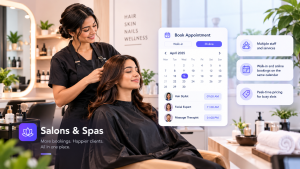
Salons & spas

Multiple staff and services, walk-in and online bookings on the same calendar, with peak-time pricing for busy slots.

Clinics & doctors

OTP-confirmed cancellations, automatic reminders, and consultation fees settled via Razorpay before the patient arrives.

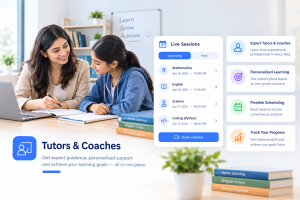
Tutors & coaches

Solo or group sessions, advance payment at booking, and a Zoom link created automatically for every online session.

Consultants

Calls booked on Meet or Zoom, reminders by email and WhatsApp, and a branded page that looks like a real business.

For any of these, appointment booking is rarely just about finding an open time slot — it’s about getting paid, getting remembered, and looking professional doing it. That’s the gap Slot was built to close.

FAQ

Frequently asked questions

Yes. Slot charges per booking instead of per seat, includes payment collection through Razorpay, Cashfree or Stripe, and sends WhatsApp reminders for every business at no extra cost.
Most alternatives are still built around meetings. Slot is built around appointments that come with a service, a price and sometimes a staff member — with payments, WhatsApp notifications and a branded booking page included as standard rather than sold as add-ons.
Yes. Slot offers a full online booking page, automatic email and WhatsApp reminders, Google Meet and Zoom link generation, and a calendar dashboard to manage every appointment.
Yes. Slot connects to Razorpay and Cashfree for India and Stripe for the rest of the world, and you can charge the full amount or just a deposit at the time of booking.
For most small teams, yes. Slot charges ten rupees per booking with no subscription, while Calendly charges a recurring fee per seat that starts around ten dollars a month and rises as you add staff or unlock more features.
No. Slot works in any country, converts time zones automatically, displays prices in any currency, and accepts payments through Stripe globally in addition to Razorpay and Cashfree in India.
Start with what you’re actually booking. If it’s purely one-to-one meetings with no payment involved, Calendly may be enough. If you run a service business that needs payment collection, staff assignment and WhatsApp reminders, Slot is built specifically for that.
Ready when you are

Ready to get paid the moment someone books?

Set your hours, add your services, share your link. Live in five minutes, no credit card needed.